Our Short List of 3

- https://www.amazon.com/dp/B0DPWQ6WSS

- https://www.amazon.com/dp/B0CRDCXRK2

- https://www.amazon.com/dp/B0CJSY4PLN
All 4 Picks at a Glance
| Product | Specs | Action |
|---|---|---|
| 1. Lenovo Legion 5i — The Most Memory in the Guide |
| Check price on Amazon |
| 2. ASUS ROG Strix G16 (G614JV-AS74) — Cooling Built Around the GPU |
| Check price on Amazon |
| 3. ASUS TUF Gaming A15 (FA507NV-EH74) — The Durability Pick |
| Check price on Amazon |
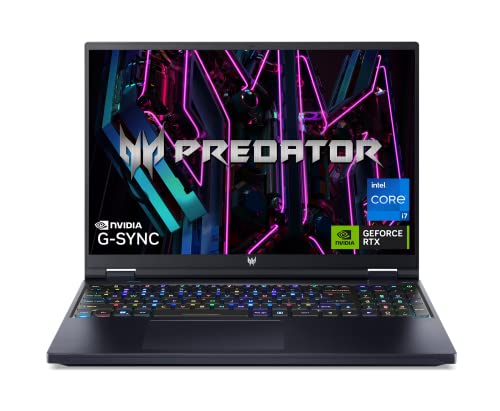 4. Acer Predator Helios 16 (PH16-71-74UU) — The Sharpest Screen |
| Check price on Amazon |
Key takeaways
- Gaming laptops in the 1500 range compared on GPU power, display, memory and storage, with four RTX 4060 picks and a checklist for choosing between them.
The 1500 range is where gaming laptops stop being compromises and start being genuinely capable machines. In this bracket you can expect a full-power RTX 4060 laptop graphics card, a fast HX-class processor, a high-refresh display, 16GB or more of DDR5 memory, and a terabyte of SSD storage — the combination that plays modern titles at high settings on the laptop’s own screen without the settings-menu surgery cheaper machines demand. This guide compares four gaming laptops that sit in or around the 1500 range on Amazon US, explains what separates them, and gives you a checklist for spending this budget well.
As an Amazon Associate we earn from qualifying purchases.
A note on the range itself: listings in this bracket move around it constantly, configurations vary, and the same model name can hide several different machines. Treat “1500 range” as the neighbourhood, verify the exact configuration on the listing before you order, and judge each machine by the components below rather than by the badge on the lid.
What the 1500 Range Should Buy You
Before the individual picks, it helps to know the baseline this budget should deliver, so you can spot a weak configuration dressed up in a strong model name.
Graphics: An NVIDIA GeForce RTX 4060 laptop GPU with 8GB of GDDR6 memory is the centre of gravity here, and the figure that matters most is its power limit. The same RTX 4060 name appears in thin laptops at reduced wattage and in performance models at up to 140W with Dynamic Boost. All four picks in this guide state a 140W-class implementation, which is what you want: it is the difference between an RTX 4060 in name and one in full effect.
Processor: HX-series Intel Core i7 parts or their AMD equivalents, with core counts in the teens or higher, are standard in this bracket. These are desktop-class chips adapted for laptops, and they keep the graphics card fed in CPU-heavy games and handle streaming, recording, and productivity work without drama.
Display: Expect at least 144Hz, and increasingly 165Hz, at 1920 x 1080 or sharper. Several picks here step up to 2560 x 1600 panels, which look noticeably crisper on a 16-inch screen and give you more room for work, at the cost of asking more of the GPU in games — a trade-off discussed below.
Memory and storage: 16GB of DDR5 is the floor, 32GB is the comfortable step up, and 1TB of PCIe SSD storage is the sensible minimum for a modern game library. Upgradeability matters: machines with two memory slots and a spare M.2 slot let you grow into the laptop instead of out of it.
Cooling and build: Sustained performance is a cooling story. Full-power GPUs only stay full-power if the chassis can move heat, so vapour chambers, liquid metal, multiple fans, and generous vents are not decoration in this class — they are the mechanism that makes the specification sheet real over a two-hour session.
The Four Picks Compared
| Model | Processor | Graphics | Memory / Storage | Display |
|---|---|---|---|---|
| Lenovo Legion 5i | Intel Core i7-13650HX | RTX 4060 8GB, 140W TGP listed | 32GB DDR5 / 1TB SSD | 16-inch QHD, 165Hz, G-SYNC |
| ASUS ROG Strix G16 G614JV-AS74 | Intel Core i7-13650HX | RTX 4060, 140W Max TGP listed | 16GB DDR5 / 1TB PCIe Gen4 SSD | 16-inch FHD+, 165Hz |
| ASUS TUF Gaming A15 FA507NV-EH74 | AMD Ryzen 7 7735HS | RTX 4060, 140W Max TGP listed | 16GB DDR5 / 1TB PCIe SSD | 15.6-inch FHD, 144Hz, 100% sRGB |
| Acer Predator Helios 16 PH16-71-74UU | Intel Core i7-13700HX | RTX 4060 | 16GB DDR5 / 1TB Gen 4 SSD | 16-inch 2560 x 1600, 165Hz, G-SYNC |
1. Lenovo Legion 5i — The Most Memory in the Guide
- https://www.amazon.com/dp/B0DPWQ6WSS
This Legion 5i configuration pairs an Intel Core i7-13650HX processor with an RTX 4060 carrying 8GB of GDDR6 memory, listed at a 140W TGP with a boost clock of 2370MHz. What sets this particular listing apart in the 1500 range is the memory and storage pairing: 32GB of RAM and a 1TB SSD. The extra memory is not about game frame rates today so much as everything around gaming — streaming while you play, a browser full of tabs behind the game, video editing, virtual machines, and the general headroom that keeps a machine feeling fast in its third year rather than its first month.
The display is a 16-inch QHD panel at 165Hz with G-SYNC, which is the sharp, smooth combination this budget should aim for, and the listing describes a four-zone RGB backlit keyboard and Windows 11 Home. Legion machines are also known for sensible port layouts and cooling that prioritises sustained performance, and the 16-inch chassis gives that cooling room to work. If you want one machine in this range that doubles as a serious work laptop, this configuration makes the strongest case.
2. ASUS ROG Strix G16 (G614JV-AS74) — Cooling Built Around the GPU
- https://www.amazon.com/dp/B0CRDCXRK2
The ROG Strix G16 takes the same core recipe — Intel Core i7-13650HX, RTX 4060 at a listed 140W Max TGP, 1TB of PCIe Gen4 SSD storage — and wraps it in ASUS’s most gaming-focused chassis in this guide. The listing highlights ROG Intelligent Cooling with liquid metal thermal compound on the CPU and a third intake fan, features aimed squarely at holding boost clocks through long sessions rather than peaking early and throttling back.
Memory is 16GB of DDR5-4800, the standard fit for the range, and the display is a 16-inch FHD+ 1920 x 1200 panel at 165Hz with full sRGB coverage and Pantone validation listed — a slightly lower resolution than the Legion’s QHD screen, which cuts both ways: less crisp for text, but easier for the RTX 4060 to drive at high refresh rates in demanding games, where many players in this bracket will prefer frames over pixels. Wi-Fi 6E and Windows 11 round out the listing. Choose the Strix if your priority is the gaming experience itself — cooling, refresh rate, and GPU power sustained over time.
3. ASUS TUF Gaming A15 (FA507NV-EH74) — The Durability Pick
- https://www.amazon.com/dp/B0CJSY4PLN
The TUF Gaming A15 is the AMD-based option here, built around a Ryzen 7 7735HS processor and, again, an RTX 4060 listed at 140W Max TGP — full power, not a cut-down variant. It carries 16GB of DDR5-4800 memory and a 1TB PCIe SSD, and its 15.6-inch Full HD display runs at 144Hz with 100% sRGB coverage, G-SYNC, and a MUX switch, the last of which lets the discrete GPU drive the display directly for the best performance the hardware can give.
Two details make the TUF distinctive in this company. The first is its 90Wh battery, large for a gaming laptop, which translates into genuinely better unplugged endurance for work and media even if gaming itself remains a plugged-in activity. The second is the TUF line’s durability focus: ASUS builds the range to a military-grade toughness standard, and for a machine that will live in a backpack between home, campus, and office, that is a practical virtue rather than a marketing one. Upgradeability is also documented for this model, with two memory slots and a second M.2 slot, so the 16GB and 1TB starting point is a floor, not a ceiling. If portability and toughness matter as much as raw specification, the A15 is the pick.
4. Acer Predator Helios 16 (PH16-71-74UU) — The Sharpest Screen
- https://www.amazon.com/dp/B0BXMNSXDD
Acer’s Predator Helios 16 brings the strongest processor name in this guide, an Intel Core i7-13700HX, alongside an RTX 4060, 16GB of DDR5 memory, and a 1TB Gen 4 SSD. Its headline is the display: a 16-inch 2560 x 1600 panel at 165Hz with G-SYNC, matching the Legion’s resolution class and giving creators and strategy or simulation players a visibly sharper, taller screen to work with. Killer Wi-Fi 6E handles the networking side.
The Predator line leans into an aggressive gaming aesthetic and a cooling-first chassis design, and this model sits squarely in the 1500 range’s expectations: full-size 16-inch body, high-refresh high-resolution screen, and components with no obvious weak link. As with the Legion, the QHD-class panel asks more of the GPU than a 1080p screen does; the RTX 4060 handles it well with the help of DLSS in supported titles, but players who chase the highest frame rates in competitive games may prefer the Strix’s lower-resolution, easier-to-drive display. Pick the Helios 16 if screen quality and CPU strength top your list.
How to Choose Between Them
These four machines share more than they differ — same GPU class, same storage size, similar displays — so the decision comes down to your second priority after gaming itself.
If you multitask heavily or keep machines for years, the Legion 5i’s 32GB of memory is the differentiator; memory is the upgrade people most often wish they had bought at the start. If you play fast competitive titles and care about sustained frame rates, the Strix G16’s cooling design and 1920 x 1200 screen are tuned for exactly that. If the laptop travels daily, the TUF A15’s durability focus, 90Wh battery, and documented upgrade slots suit a life in a bag. If you split time between games and visual work, the Predator Helios 16’s 2560 x 1600 display and stronger processor are the draw.
Whichever you choose, verify three things on the listing before ordering: the exact GPU power figure if it is stated, the memory and storage of the specific configuration in your cart (sellers list multiple configurations under one model name), and the warranty terms, which can differ between factory configurations and seller-upgraded ones.
What This Budget Does Not Buy
Honesty about the bracket helps. The 1500 range does not buy an RTX 4070 or 4080 as a standard fit, a 240Hz OLED display, or a thin-and-light chassis with full-power components — physics and pricing both forbid it. It also does not buy silence: full-power gaming laptops move a lot of air under load, and all four of these machines will be audible in a quiet room while gaming. What it does buy, done right, is a laptop that plays current games at high settings on a fast screen and remains capable for years, which is why this range is where considered buyers tend to land.
Frequently Asked Questions
Is 16GB of RAM enough in this range, or should I hold out for 32GB?
Sixteen gigabytes remains workable for gaming, and three of the four picks here ship with it in upgradeable slots. Thirty-two gigabytes, as in the Legion 5i configuration listed, is the comfortable choice for streaming, content creation, and longevity, and it removes memory from your list of future upgrades.
Why does GPU wattage matter if the GPU name is the same?
Because laptop GPUs are tuned per chassis. An RTX 4060 listed at 140W Max TGP, as in the Strix G16 and TUF A15 here, is allowed to draw far more power — and sustain higher clocks — than the same-named chip limited in a thinner design. Always check the stated figure for the exact model.
QHD or FHD at this budget?
A 2560 x 1600 panel looks sharper and suits work, but a 1920 x 1080 or 1200 panel is easier to drive at high frame rates. The RTX 4060 bridges the gap with DLSS in supported games. Competitive players usually choose frames; mixed gaming and work users usually choose pixels.
Can these laptops be upgraded later?
The TUF A15 documents two memory slots and a second M.2 slot, and 16-inch gaming chassis in this class generally offer socketed memory and expandable storage — but confirm the exact configuration’s slots on its listing or the manufacturer’s specification page before counting on it.
Do gaming laptops in this range work for school or office use?
Yes, with two caveats: battery life under light work is far shorter than an ultrabook’s, and fan noise under load is real. The TUF A15’s 90Wh battery is the strongest mitigation here; for lectures and libraries, any of these machines handles documents and browsing comfortably.
Verdict
The 1500 range rewards buyers who read configuration details instead of model names. The Lenovo Legion 5i is the most complete all-rounder in this guide thanks to its 32GB memory configuration and QHD 165Hz screen. The ASUS ROG Strix G16 is the gamer’s pick, built around cooling that protects its full-power RTX 4060. The ASUS TUF Gaming A15 is the traveller’s pick, with durability, a 90Wh battery, and room to upgrade. The Acer Predator Helios 16 is the display pick, pairing the strongest processor here with a sharp 2560 x 1600 panel. Any of the four delivers what this budget promises — full-power RTX 4060 gaming on a fast screen — so choose by the second job the laptop has to do, and verify the exact configuration before you buy.
More from Amazon
Programs that pair well with the guide above. Offers and eligibility are set by Amazon and may change.
Collect the home and kitchen items you want in one registry that guests can shop from.
Create a wedding registrySet up recurring deliveries of everyday items on eligible products. Terms and savings are set by Amazon.
Explore Subscribe & SaveFree shipping on eligible items, Prime Video and more. Eligible new members can start with a free trial.
Start a Prime free trialAudiobooks and podcasts to listen to on the go. Eligible new members can start with a free trial.
Try Audible freeAs an Amazon Associate we earn from qualifying purchases.