Key takeaways
- We compare the best wifi range extenders cnet readers want, covering coverage, speed, setup, and which extender suits a dead zone in flats and larger homes.
A dead zone is the room where the Wi-Fi gives up, and a range extender is the fix that costs less than a new router and takes minutes to set up. The best wifi range extenders cnet readers ask about are the ones comparison sites test for coverage and speed. The two extenders in this guide cover the common shapes: a compact dual-band extender for a flat or a small house, and a stronger dual-band extender with three antennas for a larger home. Each one is chosen from the details on its Amazon page, so the coverage, the speed, and the device count are all stated plainly.


This guide is for anyone with a room the router cannot reach, and for buyers who want the Wi-Fi to follow them through the house. The sections below explain how to choose coverage and speed, compare the two extenders side by side, and answer the questions buyers ask most, so you can pick an extender that kills the dead zone before you buy.
Quick Picks
As an Amazon Associate we earn from qualifying purchases
Coverage and speed are the two figures that decide whether an extender kills the dead zone, so compare them first, then the setup, because an extender that is hard to set up will sit in a drawer. Check the coverage first, then the speed, because an extender that cannot reach the dead zone is no extender at all. The two extenders below cover the small home and the larger one. A dead zone that survives the extender is a dead zone in the wrong place.
| Product | Best for | Key spec from title |
|---|---|---|
| TP-Link RE315 | Small flats and houses | AC1200, up to 1500 sq ft, 30 devices connected |
| TP-Link RE450 | Larger homes | AC1750, up to 2000 sq ft, 32 devices connected |
How to Choose
Coverage, and how far the extender reaches
The coverage of an extender decides which rooms it fixes, so read the square-foot figure before you buy. The RE315 covers up to 1500 sq ft, which suits a flat or a small house where one room is out of reach, while the RE450 covers up to 2000 sq ft, which suits a larger home where the far rooms and the garden need a signal. A figure is a maximum measured in open space, so a house with thick walls will see less, and the extender should sit halfway between the router and the dead zone rather than inside it. Measure the distance from the router to the dead zone.
Speed, and what dual-band means in practice
The speed of an extender decides whether the dead zone is fixed or merely moved, so read the band figures before you buy. The RE315 is an AC1200 extender, with 867 Mbps on the 5 GHz band and 300 Mbps on the 2.4 GHz band, while the RE450 is an AC1750 extender, with 1300 Mbps on the 5 GHz band and 450 Mbps on the 2.4 GHz band. The 5 GHz band is faster over a short distance, while the 2.4 GHz band reaches further through walls, so a dual-band extender gives the device the better band for its position.
Setup, and getting the extender running in minutes
The setup of an extender decides whether it is running in minutes or sitting in a drawer, so check how it is set up before you buy. The RE315 and the RE450 both set up from the Tether app or a web browser, and the RE button on the extender pairs it with the router at a press. The RE450 adds an Intelligent Signal Indicator, which shows whether the extender is in the right spot, so the placement is a matter of moving it until the light is right. Both extenders work with OneMesh and EasyMesh, so they can join a mesh network and share one network name with the router.
Placement and safety, and where an extender works best
An extender works best halfway between the router and the dead zone, so place it where the router’s signal is still strong. The RE450’s Intelligent Signal Indicator shows whether the spot is right, and the three adjustable antennas can be aimed at the dead zone. Keep the extender out of sun and away from water, leave space around it so air can move, and do not hide it behind furniture or inside a cupboard. The listings for both extenders state no safety certification, so the guidance here is placement only: a ventilated spot, a dry wall, and a signal that is strong enough to extend.
The 2 Best Options
Coverage, speed, and setup are the three figures that decide the extender, so compare them side by side before you settle on one. Start with the dead zone, because the extender follows from it. Measure the dead zone before you buy, because the extender must span the gap between the router and the room. The gap decides the extender.
TP-Link RE315
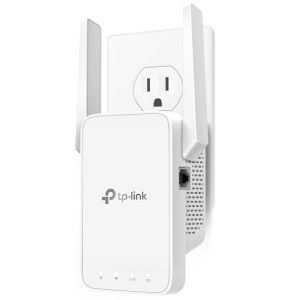
The RE315 is the compact extender in this guide, and the one that suits a flat or a small house. It is an AC1200 dual-band extender, with 867 Mbps on the 5 GHz band and 300 Mbps on the 2.4 GHz band, and it covers up to 1500 sq ft with up to 30 devices connected. The OneMesh and EasyMesh support lets it join a mesh network and share one network name with the router, and the 100 Mbps Ethernet port gives a wired connection to a device that needs one. The RE button pairs it with the router, and the Tether app sets it up in a few minutes.
Specs
- AC1200 dual-band
- 867 Mbps on 5 GHz, 300 Mbps on 2.4 GHz
- Covers up to 1500 sq ft
- Up to 30 devices
- OneMesh and EasyMesh support
- 100 Mbps Ethernet port
- RE button for easy setup
- Tether app setup
- Compact plug-in design
- Dual-band Wi-Fi
Best for: Small flats and houses with one dead zone.
Watch out for: The Ethernet port is 100 Mbps, so a wired device cannot exceed that speed.
TP-Link RE450
The RE450 is the stronger extender in this guide, and the one that suits a larger home. It is an AC1750 dual-band extender, with 1300 Mbps on the 5 GHz band and 450 Mbps on the 2.4 GHz band, and it covers up to 2000 sq ft with up to 32 devices connected. The three adjustable antennas can be aimed at the dead zone, and the Intelligent Signal Indicator shows whether the extender is in the right spot. The Gigabit Ethernet port gives a wired connection at full speed, and the RE button and Tether app set it up in minutes. The stronger pick for a larger home.
Specs
- AC1750 dual-band
- 1300 Mbps on 5 GHz, 450 Mbps on 2.4 GHz
- Covers up to 2000 sq ft
- Up to 32 devices
- 3 adjustable antennas
- Intelligent Signal Indicator
- Gigabit Ethernet port
- RE button for easy setup
- Tether app setup
- Compact plug-in design
- Dual-band Wi-Fi
Best for: Larger homes with far rooms and gardens.
Watch out for: The extender must sit where the router’s signal is still strong, not inside the dead zone itself.
Which One Fits Your Situation
A flat with one dead room
Pick the RE315 for a flat with one dead room. The 1500 sq ft coverage suits a small home, the AC1200 speed suits a standard internet plan, and the 30-device limit covers a flat full of phones, laptops, and a television. The RE button pairs it with the router in a press, and the Tether app sets it up in minutes. A flat needs a small extender, and this one is exactly that.
A larger home with far rooms
Pick the RE450 for a larger home with far rooms. The 2000 sq ft coverage reaches the far rooms and the garden, the AC1750 speed suits a fast internet plan, and the three antennas can be aimed at the dead zone. The Intelligent Signal Indicator shows whether the spot is right, and the Gigabit port gives a wired connection at full speed for the work computer. A larger home needs a stronger extender.
A home office at the far end of the house
Pick the RE450 for a home office at the far end of the house. The Gigabit Ethernet port gives the work computer a wired connection at full speed, the AC1750 speed suits video calls and large files, and the 2000 sq ft coverage reaches the far room. The Intelligent Signal Indicator shows whether the extender is in the right spot, so the office never drops a video call again.
A first extender for a new buyer
Pick the RE315 as a first extender. The setup takes minutes from the Tether app, the RE button pairs it with the router, and the compact size fits any socket. The 1500 sq ft coverage suits a flat or a small house, and the OneMesh support means it can join a mesh network later. A first extender should be simple, and this one kills a dead zone simply and quickly.
Common Mistakes
- Placing the extender inside the dead zone, where the router’s signal is too weak for it to extend.
- Buying the fastest extender when the internet plan is too slow to fill it, then wondering why the speed never rises above the plan.
- Hiding the extender behind furniture or inside a closed cupboard, where the signal cannot reach it.
- Forgetting the Ethernet port speed, then wondering why a wired device is slow on the 100 Mbps port.
- Setting up the extender on the wrong band, then blaming the extender for the slow speed it gives.
Frequently Asked Questions
Will a range extender slow down my Wi-Fi?
It can, because a single-band extender halves the speed, while a dual-band extender uses one band for the router and the other for the device. The RE315 and the RE450 are both dual-band, so the speed loss is smaller than on a single-band extender. Place the extender where the router’s signal is still strong. Dual-band loses less. Place it well.
Where should I place the extender?
Halfway between the router and the dead zone, because the extender needs a strong signal from the router to extend it. The RE450’s Intelligent Signal Indicator shows whether the spot is right, so move the extender until the light is right. Never place the extender inside the dead zone itself, because a blocked extender cannot hear the router and will extend nothing.
Do I need a new network name?
No, because both extenders work with OneMesh and EasyMesh, so they can join a mesh network and share one network name with the router. The phone then moves through the house without switching networks, which is the point of a mesh. If the router does not support mesh, the extender can still use the same name. One name for the house.
Can I use the extender with any router?
Yes, because the RE315 and the RE450 work with any standard router, and the setup runs from the Tether app or a web browser. The OneMesh and EasyMesh features need a compatible TP-Link router to share one network name, but the extender will still extend the signal of any router without them. Check the router’s bands first. Any router works.
More from Amazon
Programs that pair well with the guide above. Offers and eligibility are set by Amazon and may change.
Collect the home and kitchen items you want in one registry that guests can shop from.
Create a wedding registrySet up recurring deliveries of everyday items on eligible products. Terms and savings are set by Amazon.
Explore Subscribe & SaveFree shipping on eligible items, Prime Video and more. Eligible new members can start with a free trial.
Start a Prime free trialAudiobooks and podcasts to listen to on the go. Eligible new members can start with a free trial.
Try Audible freeAs an Amazon Associate we earn from qualifying purchases.