Our Short List of 3

- Best for: A slim everyday laptop for study and home work.
- 15.6-inch Full HD display
- AMD Ryzen 5 7520U processor
- 8GB memory, 256GB storage
- Windows 11
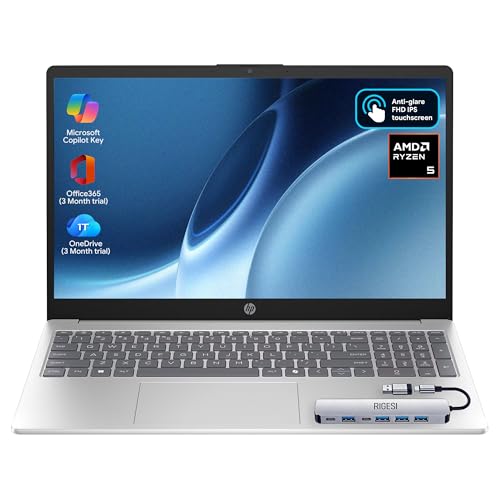
- Best for: Touchscreen with Windows 11 Pro and a docking station.
- 15.6-inch Full HD touchscreen display
- AMD Ryzen 5 7520U processor
- 8GB DDR5 RAM, 512GB SSD
- Windows 11 Pro

- Best for: The best screen in this guide, for films and photo work.
- 15.6-inch Full HD OLED display
- AMD Ryzen 5 7530U processor, 6-core, up to 4.3 GHz
- 8GB RAM, 512GB SSD
- Windows 11 Home
All 3 Picks at a Glance
| Product | Specs | Action |
|---|---|---|
| Lenovo IdeaPad Slim 3, Ryzen 5 7520U |
| Check price on Amazon |
| HP 15.6″ FHD Touchscreen Laptop, Ryzen 5 7520U |
| Check price on Amazon |
| ASUS Vivobook 15 OLED, Ryzen 5 7530U |
| Check price on Amazon |
Key takeaways
- Compare the best mid range laptops uk buyers can choose for study and work, with four 15.6-inch models judged on processor, memory, storage, and screen.
A mid-range laptop in the UK is the machine that handles study, office work and everyday browsing without the price of a premium ultrabook. The real choice is not the brand but the balance: a Ryzen 5 processor with eight gigabytes of memory and a fast SSD covers most work, while sixteen gigabytes and a better screen make the same machine last longer. The four laptops below are all 15.6-inch models with that balance in mind. A laptop that lists its processor, memory and storage clearly is easier to compare than one that hides them behind a brand name.
This guide is for students, home workers and anyone replacing an old laptop for everyday use. The four laptops below were chosen from the names and specs on their Amazon pages, comparing processor, memory, storage, screen type and the software each one ships with, so the choice comes down to what you actually do on the machine.
Quick Picks
As an Amazon Associate we earn from qualifying purchases
| Product | Best for | Key spec from title |
|---|---|---|
| Lenovo IdeaPad Slim 3, Ryzen 5 7520U | A slim everyday laptop for study | 15.6″ FHD, Ryzen 5 7520U, 8GB, 256GB |
| HP 15.6″ FHD Touchscreen Laptop, Ryzen 5 7520U | Touchscreen with Windows 11 Pro | 15.6″ FHD touchscreen, Ryzen 5 7520U, 8GB DDR5, 512GB |
| ASUS Vivobook 15 OLED, Ryzen 5 7530U | The best screen in this guide | 15.6″ FHD OLED, Ryzen 5 7530U, 8GB, 512GB |
| Acer Aspire 3 A315-24PT-R0UX, Ryzen 5 7520U | The most memory for the money | 15.6″ FHD IPS touch, Ryzen 5 7520U, 16GB, 512GB |
How to Choose
Processor, and why Ryzen 5 suits the middle
A Ryzen 5 processor is the sweet spot for a mid-range laptop, because it handles documents, video calls, browser tabs and light photo work without the cost of a Ryzen 7. The Ryzen 5 7520U in three of these laptops is a four-core chip built for thin machines, while the Ryzen 5 7530U in the ASUS Vivobook 15 has six cores and reaches higher speeds, which suits heavier multitasking. Check the processor number in the listing, since a similar-looking model can hide a much slower chip. A laptop that lists its processor clearly is easier to compare than one that only says the brand.
Memory, storage, and how long the laptop lasts
Eight gigabytes of memory covers everyday work, but sixteen gigabytes keeps the laptop comfortable for longer as software grows, which is why the Acer Aspire 3 with 16GB stands out here. Storage matters just as much: 256GB fills fast once photos and downloads pile up, while 512GB leaves room for a second year of files without juggling an external drive. An SSD is essential in 2026, because a hard drive makes even a fast processor feel slow. Check whether the listing says the memory is soldered or upgradable, since a soldered 8GB laptop cannot grow later.
Screen type, and what OLED changes
The screen is the part you look at all day, so the panel type matters more than the resolution number. A Full HD IPS panel, like the one on the Acer Aspire 3, gives wide viewing angles and steady colours for shared work. An OLED panel, like the one on the ASUS Vivobook 15, gives deeper blacks and stronger contrast, which suits films and photo editing. A touchscreen adds tapping and scrolling with a finger, which the HP and Acer models both offer. Check the listing for the panel type before buying, since two laptops with the same resolution can look very different.
UK buyers, keyboard layout, and power
UK buyers should check two details that do not appear in the headline specs. First, the keyboard layout: a UK keyboard has a pound sign on the number three key and a different Enter key shape from a US keyboard, so check the listing says UK layout or ask the seller before ordering. Second, the power adapter: confirm the listing includes a UK three-pin adapter, or budget for one, since a US adapter needs a travel plug to work at home. The laptops here are listed on Amazon US pages, so confirm layout, adapter and warranty terms on the listing before ordering.
The 4 Best Options
Lenovo IdeaPad Slim 3, Ryzen 5 7520U
- Best for: A slim everyday laptop for study and home work.
- 15.6-inch Full HD display
- AMD Ryzen 5 7520U processor
- 8GB memory, 256GB storage
- Windows 11
A slim everyday laptop for study and home work.
256GB of storage fills fast, so plan for an external drive or cloud storage as files grow.
This Lenovo laptop suits a student or home worker who wants a slim everyday machine at the lowest spec in this guide. The 15.6-inch Full HD display keeps text sharp for documents and lectures, the Ryzen 5 7520U handles browsing, video calls and office work, and 256GB of storage covers a term of files. Eight gigabytes of memory keeps the machine responsive for everyday tasks, and the slim chassis slips into a bag without the weight of a gaming laptop. The Abyss Blue finish gives the machine a tidy look. Windows 11 comes installed, so the machine is ready to use out of the box.
HP 15.6″ FHD Touchscreen Laptop, Ryzen 5 7520U
- Best for: Touchscreen with Windows 11 Pro and a docking station.
- 15.6-inch Full HD touchscreen display
- AMD Ryzen 5 7520U processor
- 8GB DDR5 RAM, 512GB SSD
- Windows 11 Pro
Touchscreen with Windows 11 Pro and a docking station.
Check the listing for a UK keyboard layout and a UK power adapter before ordering.
This HP laptop suits a buyer who wants a touchscreen and Windows 11 Pro in a mid-range machine. The 15.6-inch Full HD touchscreen adds tapping and scrolling with a finger, the Ryzen 5 7520U processor handles everyday work, and eight gigabytes of DDR5 memory keeps the machine responsive. Five hundred and twelve gigabytes of SSD storage leaves room for files without an external drive, and Windows 11 Pro adds the business features that Home leaves out. Wi-Fi 6 keeps wireless connections fast, and the HD camera handles video calls. The listing also includes a docking station, which suits a desk setup with an external monitor.
ASUS Vivobook 15 OLED, Ryzen 5 7530U
- Best for: The best screen in this guide, for films and photo work.
- 15.6-inch Full HD OLED display
- AMD Ryzen 5 7530U processor, 6-core, up to 4.3 GHz
- 8GB RAM, 512GB SSD
- Windows 11 Home
The best screen in this guide, for films and photo work.
OLED screens cost more to replace, so a case and a screen protector are worth the small extra cost.
This ASUS laptop suits a buyer who cares most about the screen, because its OLED panel gives the strongest picture in this guide. The 15.6-inch Full HD OLED display shows deeper blacks and stronger contrast than the IPS panels here, which suits films, photo editing and long reading sessions. The Ryzen 5 7530U processor has six cores and reaches up to 4.3 GHz, so it handles heavier multitasking than the four-core chips in the other laptops. Eight gigabytes of memory and a 512GB SSD cover everyday work with room for files, and Windows 11 Home comes installed. Radeon graphics handle the display work.
Acer Aspire 3 A315-24PT-R0UX, Ryzen 5 7520U
This Acer laptop suits a buyer who wants the most memory for the money, because sixteen gigabytes of LPDDR5 memory is double what the other laptops here offer. The 15.6-inch Full HD IPS touchscreen gives wide viewing angles and finger control, the Ryzen 5 7520U processor handles everyday work, and a 512GB NVMe SSD keeps loading fast with room for files. Wi-Fi 6 covers wireless networking for fast downloads, and Windows 11 Home comes installed, so the machine is ready out of the box. The extra memory keeps the machine comfortable as software grows, which is what makes a mid-range laptop last an extra year or two.
Specs
- 15.6-inch Full HD IPS touchscreen display
- AMD Ryzen 5 7520U processor
- 16GB LPDDR5 memory, 512GB NVMe SSD
- Wi-Fi 6
- Windows 11 Home
- Model A315-24PT-R0UX, 2024 model year
Best for: The most memory for the money in this guide.
Watch out for: Check the listing for a UK keyboard layout and a UK power adapter before ordering.
ASIN: B0CJV41KZN
Which One Fits Your Situation
A student who needs a slim everyday laptop
Pick the Lenovo IdeaPad Slim 3, because its slim chassis and 15.6-inch Full HD screen suit lectures, library work and carrying between classes. The 256GB of storage covers a term of files, and Windows 11 is ready out of the box. The Ryzen 5 7520U handles browsing, video calls and office work, so the machine covers a full study day.
A home worker who wants a touchscreen and Pro software
Pick the HP 15.6-inch touchscreen laptop, because Windows 11 Pro adds business features and the docking station suits a desk with an external monitor. The 512GB SSD leaves room for work files, and the touchscreen adds finger control for quick scrolling. Wi-Fi 6 covers wireless networking, and the HD camera handles video calls for remote work.
Films, photos and long reading sessions
Pick the ASUS Vivobook 15 OLED, because its OLED panel gives deeper blacks and stronger contrast than the other screens here. The six-core Ryzen 5 7530U also handles heavier multitasking, so films, editing and browser tabs run together smoothly. The 512GB SSD leaves room for files, and the OLED panel suits long reading sessions as well as films.
The laptop that should last the longest
Pick the Acer Aspire 3 A315-24PT-R0UX, because sixteen gigabytes of memory is double the other laptops here and keeps the machine comfortable as software grows. The IPS touchscreen and 512GB NVMe SSD round out a machine built to last an extra year or two. Wi-Fi 6 covers wireless networking, and Windows 11 Home comes installed, so the machine is ready out of the box.
Common Mistakes
- Buying on brand alone and ignoring the processor number, which can hide a much slower chip.
- Choosing 256GB of storage and filling it within months, then juggling files on an external drive.
- Picking a laptop for its price and missing that the memory is soldered, so it can never grow.
- Ordering from a US listing without checking for a UK keyboard layout and a UK power adapter, then needing a travel plug and a new keyboard habit.
- Comparing two Full HD laptops by resolution alone, when the panel type changes how the screen looks.
Frequently Asked Questions
What is the best mid range laptop in the UK?
The best choice depends on what you do most. The Acer Aspire 3 gives the most memory for the money, the ASUS Vivobook 15 OLED gives the best screen, and the HP touchscreen adds Windows 11 Pro with a docking station. All four laptops here use Ryzen 5 processors with fast SSD storage.
Is 8GB of RAM enough for a mid range laptop?
Eight gigabytes covers everyday work such as documents, browsing, video calls and streaming, and three of the laptops here ship with it. Sixteen gigabytes, like the Acer Aspire 3, keeps the machine comfortable for longer as software grows, and suits heavier multitasking or photo work. The extra memory also means more browser tabs stay open without slowing the machine down.
Do I need a touchscreen on a laptop?
A touchscreen adds tapping and scrolling with a finger, which suits quick navigation. It is not essential for documents or browsing, and a non-touch screen costs less. Finger control suits quick scrolling, though a mouse or trackpad does the same job. The HP and Acer laptops here offer touchscreens, while the Lenovo and ASUS models do not.
Should UK buyers check the keyboard layout before ordering?
Yes, a UK keyboard has a pound sign on the number three key and a different Enter key shape from a US keyboard. Check the listing says UK layout or ask the seller before ordering, and confirm the power adapter is a UK three-pin type so it works at home without a travel plug.
More from Amazon
Programs that pair well with the guide above. Offers and eligibility are set by Amazon and may change.
Collect the home and kitchen items you want in one registry that guests can shop from.
Create a wedding registrySet up recurring deliveries of everyday items on eligible products. Terms and savings are set by Amazon.
Explore Subscribe & SaveFree shipping on eligible items, Prime Video and more. Eligible new members can start with a free trial.
Start a Prime free trialAudiobooks and podcasts to listen to on the go. Eligible new members can start with a free trial.
Try Audible freeAs an Amazon Associate we earn from qualifying purchases.