Key takeaways
- Depth before width: A 24-inch top handles a laptop and a single display comfortably. If you run a monitor arm, dual screens, or sketch on paper, step up to 28 or 30 inches. Depth is the dimension people regret skimping on.
- Frame stability at full extension: Wobble reveals itself at standing height, not sitting. Look for dual-motor lifts, a wide crossbar, and generous leveling feet. Stated capacity, typically 176 to 220 pounds, is a reasonable proxy for structural rigidity.
- Memory presets and motor noise: Three presets cover sit, stand, and a shared setting. Four gives you room for a treadmill or a second user. Quiet lift systems matter more than raw speed if you work in a bedroom or an open-plan space.
- Finish as a room decision: Warm maple and brown tops soften a space and pair well with wood floors and textiles. Black frames with black tops read graphic and disappear against dark walls. Decide whether the desk should recede or anchor.
- Storage and cable strategy: Integrated drawers, hooks, and cable trays keep a moving surface from turning into a tangle. Every adjustable desk needs a cable plan, since the whole thing travels vertically several times a day.
What's inside
The adjustable desk has quietly become the most consequential piece of furniture in a home office, and also the easiest one to get wrong. Most shoppers start with a height range and a price cap, then discover six months later that the real problems are elsewhere: a top too shallow for a monitor arm, a frame that shimmies at standing height, a motor loud enough to derail a call, or a finish that reads sterile against the rest of the room. A desk lives in your sightline all day. It has to work mechanically and hold its own visually.
This guide approaches the category the way a designer would specify it: surface proportions first, then frame stability, then the finish and how it sits in a real room. Below are the adjustable desks worth considering in 2026, drawn from models that balance engineering with restraint, plus a short framework for matching one to your space, your storage habits, and the way you actually move through a workday.
As an Amazon Associate we earn from qualifying purchases.


How to Choose a/an Adjustable Desk (2026)
- Depth before width: A 24-inch top handles a laptop and a single display comfortably. If you run a monitor arm, dual screens, or sketch on paper, step up to 28 or 30 inches. Depth is the dimension people regret skimping on.
- Frame stability at full extension: Wobble reveals itself at standing height, not sitting. Look for dual-motor lifts, a wide crossbar, and generous leveling feet. Stated capacity, typically 176 to 220 pounds, is a reasonable proxy for structural rigidity.
- Memory presets and motor noise: Three presets cover sit, stand, and a shared setting. Four gives you room for a treadmill or a second user. Quiet lift systems matter more than raw speed if you work in a bedroom or an open-plan space.
- Finish as a room decision: Warm maple and brown tops soften a space and pair well with wood floors and textiles. Black frames with black tops read graphic and disappear against dark walls. Decide whether the desk should recede or anchor.
- Storage and cable strategy: Integrated drawers, hooks, and cable trays keep a moving surface from turning into a tangle. Every adjustable desk needs a cable plan, since the whole thing travels vertically several times a day.
The Best Adjustable Desks (2026) Reviewed
FEZIBO 48 × 24 Electric Standing Desk, Maple
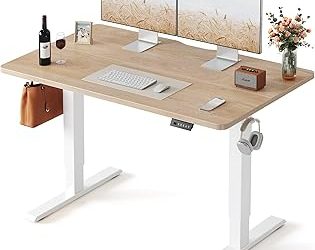
The maple top is the reason to buy this one: a warm, low-contrast surface that behaves like furniture rather than office equipment, which makes it an easy fit for a bedroom corner or a shared living area. Three memory presets and a compact 48 by 24 footprint suit single-monitor setups where the desk needs to look intentional in a room people actually live in.
ErGear 48 × 24 Electric Standing Desk, Black
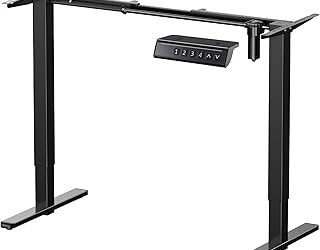
ErGear’s steel frame and 176-pound capacity deliver reassuringly little movement at standing height, and the four presets are a genuine advantage for households sharing one workstation. The all-black treatment is the most architectural option here, best in a room with enough natural light to keep it from feeling heavy.
VIVO 60 × 30 Standing Desk (DESK-KIT-1B6-P3B)
At 60 by 30 inches with a 220-pound rating, this is the desk for people who genuinely spread out: dual displays, a document stack, and still room to write. The included cable tray and full-size mouse pad surface handle the two details most large desks leave to the owner.
Veken 47 × 28 Electric Standing Desk with Drawers, Brown
Veken solves the storage problem that most adjustable desks ignore, pairing drawers, a cable organizer, and a hook with a quiet lift in a 47 by 28 frame. The brown finish is the warmest option in this group and works well in smaller rooms where a desk has to double as a console or study table.
VIVO 60 × 30 Extra Deep Standing Desk (DESK-KIT-1B6B-30)
Same generous 1B-series frame and 220-pound capacity, with an extra-deep top that gives monitor arms the setback they need for comfortable viewing distance. Choose this over the P3B version when screen ergonomics matter more than a bundled mouse pad surface.
Frequently Asked Questions
Is a dual-motor desk worth the upgrade?
For most people, yes. Dual motors lift more evenly, handle heavier loads without straining, and hold their height more confidently over years of daily cycling.
How much depth do I actually need?
Twenty-four inches works for a laptop or one monitor. If you use a monitor arm, go to 28 or 30 inches so the screen can sit far enough back for comfortable focus.
Do adjustable desks work on carpet?
They do, though leveling feet become essential. Check them after assembly and again a few weeks in, since carpet compresses unevenly under the load.
What if I want storage but also height adjustment?
Look for desks with drawers designed to travel with the top, like the Veken. Freestanding storage next to a moving surface tends to create awkward gaps and cable strain.
Final Thoughts
For most home offices, the ErGear 48 × 24 hits the clearest balance of stability, presets, and price, while the FEZIBO in maple is the pick when the desk needs to look like furniture in a lived-in room. If you have the floor space, the VIVO 60 × 30 extra-deep model is the one that stops feeling like a compromise, giving monitor arms proper distance and leaving room to think.
One note: I cleaned up the heading “The Best Adjustable Desk (2026)s Reviewed” to “The Best Adjustable Desks (2026) Reviewed,” which looked like a template artifact. Say the word if you need it verbatim.