Key takeaways
- Motion type: Rocker boards tilt on a single axis and are the easiest to use while typing. Wobble boards tilt in every direction for more engagement. Rollerball and swivel decks are the most demanding — excellent for movement breaks, distracting during focused work.
- Deck size: Look for a platform wide enough to stand hip-width apart, roughly 26 inches or more. Narrow boards force a cramped stance that creates its own fatigue, and larger decks let you shift position rather than reset your feet.
- Tilt range: A shallow 10–15 degree tilt encourages micro-movement without pulling your eyes off the screen. Steeper angles suit therapy and training but rarely pair well with a keyboard.
- Surface and grip: Textured wood, cork, or rubber tread keeps socked feet secure. If you work barefoot, prioritize a smooth-sanded or padded top; if you wear shoes indoors, choose a surface that won’t scuff.
- Materials and finish: Layered birch or bamboo reads as furniture and ages well. Molded foam and plastic are lighter and cheaper but look like gym equipment in a living space — worth considering if your desk sits in a shared room.
What's inside
A standing desk solves one problem and quietly creates another. Trading eight hours of sitting for eight hours of standing still swaps one fixed posture for a different fixed posture, and the body notices: heels start to ache by mid-afternoon, knees lock, hips stiffen, and the calves you were promised would benefit just feel tight. Cushioned anti-fatigue mats soften the floor, but they don’t do anything about the deeper issue, which is that you aren’t moving. A balance board does. It introduces small, near-unconscious weight shifts that keep ankles, calves, and core mildly engaged, which is what actually keeps a standing workday comfortable.
This guide looks at six boards built specifically for desk use rather than gym work, from gentle side-to-side rockers to rollerball designs that demand real attention. We’ve weighed motion style, deck size, surface grip, and — because most home offices now share space with the rest of the house — how each one looks when it’s parked under a desk in plain view. Below you’ll find the shortlist, followed by what to prioritize and short reviews of the top five.
As an Amazon Associate we earn from qualifying purchases.



How to Choose a Balance Board For Standing Desk (2026)
- Motion type: Rocker boards tilt on a single axis and are the easiest to use while typing. Wobble boards tilt in every direction for more engagement. Rollerball and swivel decks are the most demanding — excellent for movement breaks, distracting during focused work.
- Deck size: Look for a platform wide enough to stand hip-width apart, roughly 26 inches or more. Narrow boards force a cramped stance that creates its own fatigue, and larger decks let you shift position rather than reset your feet.
- Tilt range: A shallow 10–15 degree tilt encourages micro-movement without pulling your eyes off the screen. Steeper angles suit therapy and training but rarely pair well with a keyboard.
- Surface and grip: Textured wood, cork, or rubber tread keeps socked feet secure. If you work barefoot, prioritize a smooth-sanded or padded top; if you wear shoes indoors, choose a surface that won’t scuff.
- Materials and finish: Layered birch or bamboo reads as furniture and ages well. Molded foam and plastic are lighter and cheaper but look like gym equipment in a living space — worth considering if your desk sits in a shared room.
The Best Balance Board For Standing Desk (2026)s Reviewed
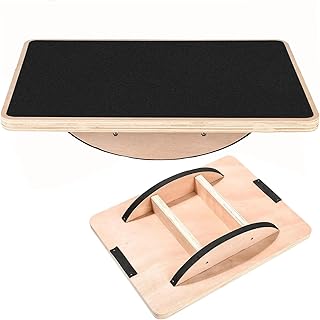
Trobing Wooden Balance Board with Rollerball
The rollerball design under a wide wooden deck gives you two boards in one: leave the ball centered for a subtle rocking motion, or let it travel for genuine multidirectional work. The warm plywood finish is the most furniture-like of the group, which makes it the easy pick if your desk lives somewhere guests will see it.
Large Rocker Board Comfort Mat
A generous single-axis rocker with a cushioned top, this is the most forgiving board here and the one we’d recommend to anyone new to standing all day. The extra deck width matters more than people expect — you can widen your stance, cross your feet, or step half off without breaking concentration.
Gaiam Evolve Balance Board
Gaiam’s Evolve has become something of a default for a reason: a low, stable tilt, a broad textured deck, and a rounded profile that slides neatly out of the way. It’s the best all-rounder for full-day use, and it doubles credibly as physical-therapy and stability equipment on weekends.
2-in-1 Balance Board & Foot Mat
Flip it one way for a 360-degree swivel wobble, flip it over for a nubbed massage-and-cushion surface — an unusually practical answer to the fact that nobody wants active balance for eight straight hours. In matte black it disappears under a desk better than most.
Wooden Wobble Board with Ankle Support
The most training-oriented board on the list, with a contoured deck that supports the ankle through a wider range of motion and an anti-slip top that holds firm in socks. Best suited to shorter, deliberate movement sessions and core work rather than continuous typing.
Frequently Asked Questions
How long should I use a balance board each day?
Start with 20 to 30 minutes in blocks and build from there. Most people settle into one to three hours across a workday, alternating between the board, flat standing, and sitting.
Will a balance board help with back pain?
Many users report relief, since gentle movement reduces the spinal loading that comes from standing rigidly. It isn’t a treatment, though, and desk height and monitor position matter just as much.
Barefoot, socks, or shoes?
Barefoot or socked feet give the best sensory feedback and are ideal on textured wood. Shoes are fine on foam and rubber surfaces, and they help if you have foot sensitivity.
Can I use one on carpet or a rug?
Low-pile carpet works well and adds stability. Thick rugs can make a board feel unpredictable, so place it on a hard floor or a firm mat instead.
Final Thoughts
For most home offices, the Gaiam Evolve hits the right balance of stability, deck size, and low-profile looks for all-day use. Choose the Trobing rollerball board if you want a board that grows with you and looks like intentional furniture, or the 2-in-1 Balance Board & Foot Mat if you’d rather switch between active balance and pure cushioning as the day wears on.