Key takeaways
- Depth over width: Aim for 28 to 32 inches deep. A 60-inch desk that’s only 23 inches deep forces large monitors uncomfortably close, and no amount of extra length fixes eye strain.
- Weight capacity, stated honestly: Three panels plus arms can clear 60 pounds before you add a tower. Look for 150 pounds or more, especially on lift desks where the motor carries everything.
- Clamp-friendly edges: If you plan to use monitor arms, you need a flat, unlipped rear edge and at least 3/4-inch thickness. Built-in risers are convenient but lock your screen height permanently.
- Integrated power: Multi-monitor rigs eat outlets fast. Onboard sockets and USB ports save you from a floor-level daisy chain and keep cables from dangling in the knee zone.
- Geometry that fits the room: L-shapes give you a second plane for peripherals; U-shapes wrap you in surface but demand real floor area. Straight desks stay flexible if you rearrange often.
What's inside
Two monitors changed how we work; three changed what furniture has to do. The desk that felt generous with a single laptop suddenly can’t hold a stand, a keyboard, and a coffee cup at the same time, and the cheap fix — pushing screens to the back edge — buys width at the cost of viewing distance. Most people don’t notice the trade until their neck does. Depth, load rating, and cable routing matter more than square footage here, and almost no product page leads with those numbers.
This guide looks at desks through the lens of a multi-screen setup specifically: how far back you can actually push a 32-inch panel, whether the surface will hold 60 pounds of monitor arm and glass without flexing, and where the power strip lives once three displays and a dock are competing for outlets. Below are the picks worth considering in 2026, followed by the specs I’d check before adding anything to a cart.
As an Amazon Associate we earn from qualifying purchases.


How to Choose a/an Home Office Desk For Multiple Monitors (2026)
- Depth over width: Aim for 28 to 32 inches deep. A 60-inch desk that’s only 23 inches deep forces large monitors uncomfortably close, and no amount of extra length fixes eye strain.
- Weight capacity, stated honestly: Three panels plus arms can clear 60 pounds before you add a tower. Look for 150 pounds or more, especially on lift desks where the motor carries everything.
- Clamp-friendly edges: If you plan to use monitor arms, you need a flat, unlipped rear edge and at least 3/4-inch thickness. Built-in risers are convenient but lock your screen height permanently.
- Integrated power: Multi-monitor rigs eat outlets fast. Onboard sockets and USB ports save you from a floor-level daisy chain and keep cables from dangling in the knee zone.
- Geometry that fits the room: L-shapes give you a second plane for peripherals; U-shapes wrap you in surface but demand real floor area. Straight desks stay flexible if you rearrange often.
The Best Home Office Desk For Multiple Monitors (2026)s Reviewed
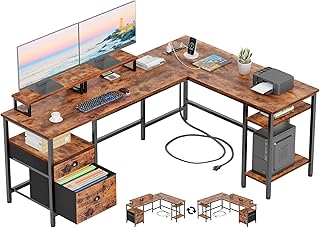
Furologee 66″ L-Shaped Desk with Power Outlet
A well-resolved package for a corner: two monitor risers, a file drawer, open shelving, and onboard power, all reversible so the return can sit on either side. The rustic brown laminate reads warmer than most gaming-adjacent desks, which makes it easier to live with in a shared room.
55″ U-Shaped Electric Standing Desk
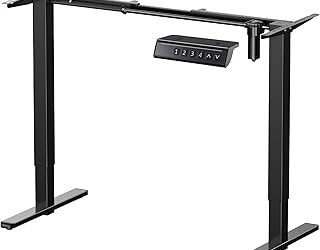
The wrap-around footprint puts a third screen within neck-turn distance instead of arm’s reach, and the keyboard tray reclaims depth you’d otherwise lose to a mechanical board. Three presets and a 154-pound capacity mean a loaded setup still rises smoothly; the LED underglow is optional theater.
Grandder 55×32 Extra-Deep Electric Standing Desk
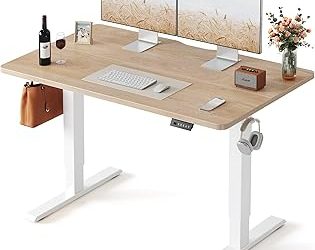
The one I’d point ultrawide owners toward first. At 32 inches deep it lets a 49-inch panel sit far enough back to actually see the edges, and the 176-pound rating plus anti-collision sensors handle a flanking pair of secondary screens without complaint. The oak finish keeps it looking like furniture, not equipment.
LVB 70.8″ Industrial Computer Desk
Nearly six feet of uninterrupted top, no risers, no shelves — which is exactly what you want if monitor arms are part of the plan. The steel frame and open underside suit two-person or two-station use, though you’ll want to budget for your own cable tray.
Korfile 59″ L-Shaped Desk with Power Outlets
A tidier, more storage-dense take on the corner desk, with four adjustable drawers that swallow the peripheral clutter multi-screen setups generate. In black it disappears into a bedroom or den, and the reversible layout means you’re not committed to one wall.
Frequently Asked Questions
How wide does a desk need to be for three monitors?
For three 24-inch panels, plan on 55 to 60 inches minimum. For three 27-inch screens, 70 inches or an L-shape is more realistic, since a flat row that wide pushes the outer displays past a comfortable viewing angle.
Can standing desks handle heavy multi-monitor setups?
The better ones can. Check the stated capacity against your actual load, including arms and any tower, and leave headroom — motors last longer when they aren’t running at their ceiling. Dual-motor frames are steadier at full height than single-motor designs.
Are built-in monitor stands worth it?
They’re a good value if you’re using two same-size displays and don’t want to spend on arms. If you mix screen sizes, want portrait orientation, or care about reclaiming desktop space, arms are the better long-term buy.
L-shaped or straight for multiple screens?
L-shaped, if the room allows. The angle brings a third display into your natural field of view and gives you a staging area for a laptop or notebook. Straight desks are easier to place and better suited to arm-mounted setups.
Final Thoughts
For most multi-screen setups, the Grandder 55×32 is the smartest starting point — that extra depth solves the problem people usually blame on width. Choose the Furologee 66″ L-shaped if you want built-in storage and power in a corner, or the LVB 70.8″ if monitor arms and a clean open span are the priority.