Key takeaways
- Lumbar support: Look for adjustable lower-back support that can be positioned to meet your natural curve, rather than a fixed cushion that may sit too high or low.
- Seat comfort: A contoured, adequately padded seat helps distribute pressure during extended sessions. Check both seat depth and width if you prefer to change positions throughout the day.
- Adjustability: Height adjustment is essential, while reclining tension, tilt lock, and adjustable armrests make it easier to align the chair with your desk and posture.
- Materials and airflow: Mesh backs promote ventilation, especially in warm rooms, while thicker upholstered cushions can provide a softer, more lounge-like feel.
- Scale and stability: Confirm the chair’s weight capacity, footprint, and base design. A chair should feel planted when reclining and leave enough room for natural movement.
What's inside
Finding a supportive office chair under $200 can feel like a compromise between comfort, adjustability, and visual appeal. Many budget models look promising online but fall short with rigid lumbar support, thin seat padding, or armrests that crowd the desk.
This guide focuses on the features that matter for real workdays: breathable materials, useful adjustment ranges, stable construction, and a seat that remains comfortable beyond the first hour. We’ve selected five standout options for home offices, study spaces, and flexible work areas where ergonomics should feel considered rather than clinical.
As an Amazon Associate we earn from qualifying purchases.


How to Choose an Ergonomic Office Chair Under $200 (2026)
- Lumbar support: Look for adjustable lower-back support that can be positioned to meet your natural curve, rather than a fixed cushion that may sit too high or low.
- Seat comfort: A contoured, adequately padded seat helps distribute pressure during extended sessions. Check both seat depth and width if you prefer to change positions throughout the day.
- Adjustability: Height adjustment is essential, while reclining tension, tilt lock, and adjustable armrests make it easier to align the chair with your desk and posture.
- Materials and airflow: Mesh backs promote ventilation, especially in warm rooms, while thicker upholstered cushions can provide a softer, more lounge-like feel.
- Scale and stability: Confirm the chair’s weight capacity, footprint, and base design. A chair should feel planted when reclining and leave enough room for natural movement.
The Best Ergonomic Office Chair Under $200 (2026)s Reviewed
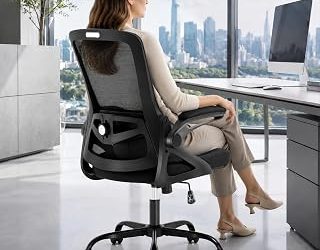
Office Chair with Flip-Up Arms and Adjustable Lumbar Support
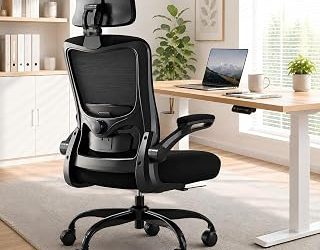
This high-back mesh chair is a practical all-rounder for compact home offices and multipurpose rooms. Its flip-up armrests let the chair slide neatly under a desk, while the generous weight capacity and adjustable lumbar support make it a sensible choice for shoppers who prioritize flexibility and everyday durability.
Fizzin Mesh Office Chair with Headrest
Fizzin’s chair takes a comfort-first approach with a breathable mesh back, adjustable lumbar support, and a thickened seat cushion. The integrated headrest gives it a slightly more relaxed, gaming-inspired profile, making it appealing for users who alternate between focused work, study, and screen-heavy leisure.
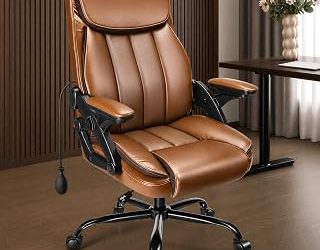
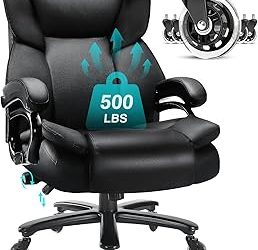
Ergonomic Padded Office Chair for Long Hours
For anyone who prefers a cushioned seat over a fully mesh design, this model offers a softer interpretation of ergonomic seating. Its adjustable padded lumbar support is designed for longer sessions, and the broad capacity rating adds confidence for a range of body types without making the chair look overly bulky.
Marsail Ergonomic Chair with 2D Headrest
This Marsail model brings a polished, contemporary look to the ergonomic category, with a contoured seat, breathable construction, adjustable armrests, and smooth-rolling wheels. Its reclining function and 2D headrest provide useful ways to shift posture during the day, particularly in a dedicated office where comfort and clean design carry equal weight.
Marsail High-Back Mesh Chair with 3D Armrests
The second Marsail option is aimed at users who want more upper-body adjustability. A high mesh back, adjustable lumbar support, headrest, and 3D armrests create a more customizable sitting experience, while the swivel base and rolling wheels suit active desks where you regularly reach, turn, and reposition.
Frequently Asked Questions
Is an office chair under $200 genuinely ergonomic?
It can be, provided expectations are realistic. Chairs in this range often offer the essential adjustments—seat height, lumbar positioning, reclining, and armrest movement—but may use simpler mechanisms or less refined padding than premium models.
Is mesh or padding better for working from home?
Mesh is usually preferable in warm rooms because it allows airflow and tends to feel supportive without trapping heat. Padded seats can feel more forgiving, especially for users who dislike firm mesh, so the best choice depends on temperature, posture, and personal comfort.
How should an ergonomic chair be adjusted?
Set the seat height so your feet rest flat and your knees are roughly level with your hips. Position the lumbar support at the small of your back, keep your shoulders relaxed, and adjust the armrests so your elbows remain close to your sides while typing.
Do I need a headrest for good posture?
No. A headrest is an optional comfort feature rather than a requirement for healthy desk posture. It can be useful when reclining or taking screen breaks, but a well-adjusted seat, backrest, and lumbar support matter more during active computer work.
Final Thoughts
For a versatile budget pick, the Office Chair with Flip-Up Arms and Adjustable Lumbar Support is especially practical, while the Fizzin offers a softer, more relaxed setup with a headrest. If you want a more refined design and broader adjustment potential, either Marsail model deserves a closer look.