Key takeaways
- Measure your desk edge first: Clamp-on power strips, shelves, and organizers list a specific thickness range, usually somewhere between 0.4″ and 2.2″. A thick butcher-block top or a beveled edge will disqualify half the market, so check with a tape measure before ordering.
- Weight capacity over footprint: A converter rated for a single laptop will sag and wobble under two 27″ monitors. Confirm the load rating with your actual gear in mind, including the monitor arms and speakers you plan to add later.
- Keep cables on the moving surface: Anything plugged into a wall outlet has to tolerate the full range of vertical travel. Mounting a surge protector to the desk itself means your cable slack stays constant and your monitors never get yanked mid-lift.
- Prioritize surge joules and port mix: Look for a real joule rating rather than a vague “surge protection” claim, and count the USB-C ports against the number of devices that already live on your desk. Fast-charge wattage matters if a laptop is sharing the strip.
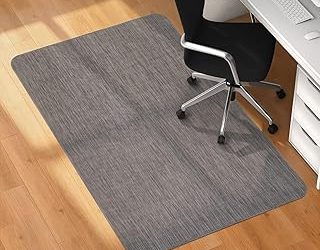
- Treat the floor as part of the setup: Standing on hard flooring for hours flattens posture fast. A contoured anti-fatigue mat encourages micro-movement, which is the actual point of standing rather than just being upright.
What's inside
Standing desks solved one problem and quietly created several others. The moment a work surface starts moving, everything on it has to move too, and most home offices aren’t built for that. Cables go taut, laptops slide, a wall outlet that was fine at seated height becomes a tripping hazard, and the novelty of standing wears off around day four when your heels start complaining. The desk itself is rarely the weak link. The ecosystem around it is.
This guide covers the accessories that actually change how a standing setup feels day to day: converters for people who don’t want to replace a desk they love, clamp-mounted power that travels with the surface, under-desk storage that reclaims floor space, and a mat engineered to keep your legs interested. Each pick below was chosen for build quality, edge-clamp compatibility, and how gracefully it handles the transition between sitting and standing.
As an Amazon Associate we earn from qualifying purchases.



How to Choose Standing Desk Accessories in 2026
- Measure your desk edge first: Clamp-on power strips, shelves, and organizers list a specific thickness range, usually somewhere between 0.4″ and 2.2″. A thick butcher-block top or a beveled edge will disqualify half the market, so check with a tape measure before ordering.
- Weight capacity over footprint: A converter rated for a single laptop will sag and wobble under two 27″ monitors. Confirm the load rating with your actual gear in mind, including the monitor arms and speakers you plan to add later.
- Keep cables on the moving surface: Anything plugged into a wall outlet has to tolerate the full range of vertical travel. Mounting a surge protector to the desk itself means your cable slack stays constant and your monitors never get yanked mid-lift.
- Prioritize surge joules and port mix: Look for a real joule rating rather than a vague “surge protection” claim, and count the USB-C ports against the number of devices that already live on your desk. Fast-charge wattage matters if a laptop is sharing the strip.
- Treat the floor as part of the setup: Standing on hard flooring for hours flattens posture fast. A contoured anti-fatigue mat encourages micro-movement, which is the actual point of standing rather than just being upright.
The Best Standing Desk Accessories Reviewed
FITUEYES 32″ Sit-to-Stand Desk Converter
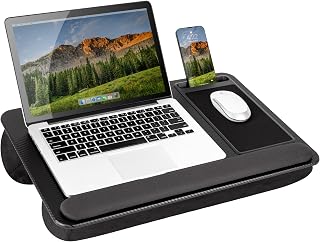
The most sensible entry point for anyone who already owns a desk worth keeping, this riser handles a dual-monitor arrangement without the wobble that plagues cheaper gas-spring designs. Assembly is genuinely quick, and the 32″ width fits most standard desks while leaving room at the sides for a notebook or coffee.
Anker Nano Clamp-On Power Strip
Anker’s clamp strip is the tidiest power solution I’ve tested for adjustable desks: six AC outlets and two USB-C ports at 70W total, with a 1500J surge rating that puts it in serious protection territory. The 0.6″–1.8″ edge range covers most desktops, and mounting it to the surface means your cable management survives every height change.
Under-Desk Side Storage Organizer with Pegboard
A no-drill clamp shelf that turns dead space beneath the desk into a home for a closed laptop, a tablet, or a hard drive. The pegboard face is the clever part, letting you hang headphones and small tools vertically instead of surrendering more desktop real estate.
CCCEI 15-Outlet Desk Clamp Surge Protector
Built for the maximalist setup, this one spaces its 15 outlets widely enough to accommodate bulky wall adapters that would block neighboring slots on a conventional strip. The 6 ft flat plug tucks behind furniture cleanly, and both USB-A and USB-C fast charging are included; note it’s specified for roughly 1.6″ tabletops.
Ergodriven Topo Mini Anti-Fatigue Mat
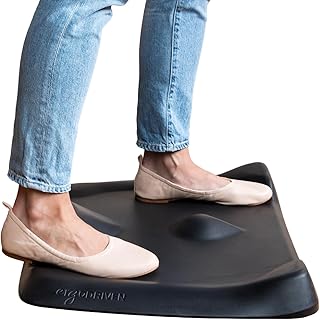
The Topo Mini brings Ergodriven’s calculated terrain to a smaller footprint, with raised edges and contours that invite you to shift weight rather than lock into one stance. The ultra-thick foam holds its shape over years of use, and the PFA- and PVC-free construction is a welcome detail for a product you stand on barefoot.
Frequently Asked Questions
Do I need a converter if I already have an adjustable desk?
No. Converters like the FITUEYES models exist specifically to add height adjustment to a fixed desk. If your desk already raises and lowers, put that budget toward power management and a mat instead.
Will a clamp-on power strip damage my desktop?
Quality clamps use padded contact points and distribute pressure across a broad surface. Check the thickness range, tighten by hand rather than with tools, and inspect veneer or soft-wood edges after the first week.
Is 32″ or 36″ the better converter width?
The 36″ FITUEYES converter suits dual monitors plus a laptop or wide keyboard-and-mouse layout. Choose the 32″ version if your desk is shallow or you want clear space beside the riser.
How long should I actually stand each day?
Most ergonomists suggest alternating rather than committing to either extreme, often around 15 to 30 minutes standing per hour of desk work. A contoured mat makes those intervals far easier to sustain.
Final Thoughts
If you’re building from scratch, start with the FITUEYES 32″ converter to get the motion you’re missing, add the Anker Nano clamp strip so your cables stop fighting the height change, and finish with the Ergodriven Topo Mini so your legs stay engaged instead of aching. Those three cover the mechanics, the power, and the comfort, which is essentially the whole problem.