
Key takeaways
- Fixed lift, 1–4 in. Foam pad sets and simple wooden plinths. Cheap and effective, but you must already be close to the right height.
- Stepped or notched, 2–8 in. Adjustable elastomer stands with discrete positions, usually in roughly 0.5–1 in steps plus a tilt option. This is the sweet spot for desktop nearfields.
- Continuous, 0–12 in or more. Threaded or sliding column stands. Overkill on a desk, useful when the monitors sit on a console or a rack behind the desk.
Best monitor isolation stands: the direct answer
The best monitor isolation stands are the ones rated for at least 1.5× the weight of a single monitor, that lift the acoustic center — the midpoint between woofer and tweeter — to within about 2 in (5 cm) of your seated ear height, and that break the mechanical path between cabinet and desk with a load-matched elastomer or a foam-and-steel-plate sandwich rather than a plain foam block. For most 5- to 6.5-inch nearfield monitors that points to an adjustable elastomer stand in the IsoAcoustics ISO-155/ISO-200 class, a Primacoustic Recoil Stabilizer, or an Auralex MoPAD set if the cabinet is light and the budget is tight. The rest of this guide is about choosing between those types by height range, weight capacity, decoupling material and how much desk you are willing to give up.
| Your situation | What to buy | Typical market range (per pair) |
|---|---|---|
| 5-inch nearfields, shallow desk, tight budget | Four-pad foam set (Auralex MoPAD class), 1–2 in lift | Usually $30–$60 |
| 6.5-inch nearfields, tweeter sits below ear level | Adjustable elastomer stand (ISO-155 / ISO-200 class) | Usually $100–$200 |
| Heavy midfield cabinets, 40 lb and up | Steel-plate recoil base or ISO-430 class stand | Usually $150–$400 |
| Desk too shallow or cluttered for a full stand | Puck-style isolators plus a small wood plinth | Usually $60–$150 |
| Standing desk, vibration travels up the frame | Load-matched elastomer isolators under monitors and desk feet | Usually $80–$250 |
| Monitors should leave the desk entirely | Desk-clamp or wall-mounted VESA shelf with pads on top | Usually $60–$200 |
What decoupling actually changes in the room
A monitor cabinet vibrates in reaction to its own driver motion. Sit it directly on a desk and two things happen. First, the desk becomes a large, thin, lightly damped panel driven by the cabinet — a passive radiator with a resonance somewhere in the 80–250 Hz region for a typical 1 in (25 mm) laminate or MDF top. That resonance adds a bump and a smeared decay to whatever the monitor is already producing, and because the desk is a big surface, it radiates in every direction. Second, the cabinet’s own front baffle vibrates slightly, and any panel vibration that reaches the floor through the desk legs and the building structure comes back as structure-borne sound.
Our top picks


As an Amazon Associate we earn from qualifying purchases at no extra cost to you.
The audible result is not “more bass” in a clean sense. It is a low-mid thickness that makes a kick drum sound like it has a tail it doesn’t have, and a stereo image that shifts when you move your head because the desk contribution arrives from a different place than the direct sound. Decoupling does not remove the room’s modal behaviour — no stand fixes a 10 × 12 ft room with a square footprint — but it removes one variable you can control for the price of a decent dinner. Engineers describe the change as tighter low end and a more stable center image; the measurable version is a cleaner impulse response and less energy in the desk panel.
Isolation is also the cheapest upgrade in a monitoring chain. Before you spend on a new interface or a room correction plugin, spending $100 on stands that stop your desk from singing is usually the larger audible change.
The four things that decide which stand you buy
1. Height adjustment: solve the geometry first
Most desks are 28–30 in (71–76 cm) tall. Seated ear height for an average adult in an office chair lands around 46–50 in (117–127 cm) from the floor. A 5-inch monitor sitting directly on a 29 in desk typically puts its acoustic center at 38–41 in — that is 5–10 in below your ears. That mismatch costs you high-frequency energy and it changes as you move, because you are listening off-axis vertically.
So the useful spec is not “adjustable” but “adjustable over the range I need.” Three categories exist:
- Fixed lift, 1–4 in. Foam pad sets and simple wooden plinths. Cheap and effective, but you must already be close to the right height.
- Stepped or notched, 2–8 in. Adjustable elastomer stands with discrete positions, usually in roughly 0.5–1 in steps plus a tilt option. This is the sweet spot for desktop nearfields.
- Continuous, 0–12 in or more. Threaded or sliding column stands. Overkill on a desk, useful when the monitors sit on a console or a rack behind the desk.
Measure before buying: with your chair at your normal working position, note your seated ear height, then measure the height of the tweeter with the monitor sitting on the desk. The difference is the lift you need, plus or minus 2 in. If that number is under 2 in, a pad set is enough. If it is 4 in or more, you need a proper stand or a different desk arrangement.
2. Weight load: pick the middle of the range, not the edge
Every isolation product has a load window. Foam works best when it is compressed about 10–20% of its thickness; elastomers work best at roughly 5–15% deflection. Below that window the material is too stiff to decouple. Above it, the material bottoms out, transmits vibration directly and takes a permanent set.
That means a stand rated “up to 30 lb” is not at its best with a 29 lb monitor. Aim for a monitor weight between about 40% and 75% of the rated maximum, and never above 100%. Sizes and typical weights:
| Monitor class | Typical cabinet weight (each) | Stand class to look for | Rated capacity to buy |
|---|---|---|---|
| 3–4 in desktop | 3–8 lb (1.4–3.6 kg) | Puck or pad | 8–15 lb |
| 5 in nearfield | 10–18 lb (4.5–8.2 kg) | ISO-155 class | 18–30 lb |
| 6.5 in nearfield | 18–28 lb (8.2–12.7 kg) | ISO-200 class | 30–45 lb |
| 8 in nearfield | 25–45 lb (11–20 kg) | ISO-430 / recoil class | 45–70 lb |
| Midfield / main | 45–90 lb (20–41 kg) | Steel-plate base or floor stand | 90–140 lb |
Add accessories to the weight before you choose: a monitor with a mounting bracket, a heavy power supply resting on the stand, or a desktop stand that itself weighs 4 lb all count toward the load. The 1.5× rule exists because foam and elastomer both lose capacity as they age.
3. Decoupling material: what actually absorbs what
Frequency matters. Foam absorbs high frequencies well and does very little below about 200 Hz. Viscoelastic polyurethane — the Sorbothane family — converts low-frequency vibration into a small amount of heat and works down to a few tens of hertz when the load is matched. Steel plate over foam adds mass, which lowers the resonant frequency of the whole assembly and is why recoil-style bases sound cleaner under large cabinets than a bare foam block does.
A practical rule: the heavier and deeper your monitor goes, the more you want elastomer or mass-loaded foam, and the less a plain foam pad will do for you. Conversely, under a small 4-inch desktop monitor, a well-sized foam pad is entirely adequate and an elastomer stand is a nice-to-have.
4. Desk footprint: the constraint nobody mentions
Two 6.5-inch monitors on stands with a 9 × 11 in base occupy about 198 sq in of a 47 × 24 in desk — roughly 18% of the surface. Add a laptop, a keyboard and a mouse and the desk is full. Measure the depth of your desk before you buy, and remember that a stand’s depth is often larger than the monitor’s own footprint because the base spreads for stability.
Approximate footprints per stand:
- Puck feet or hemispheres: 1–2 in diameter each, four per monitor, effectively zero extra footprint.
- Foam pad sets: 2.5–3 in square per pad, four per monitor, roughly 5–6 in of total spread.
- Adjustable elastomer stands: 6–8 in wide × 5–7 in deep.
- Steel-plate recoil bases: 8–10 in wide × 9–12 in deep.
- Wooden desktop stands: 6–9 in wide × 6–9 in deep, often the widest because they double as tilt platforms.
- Desk-clamp or VESA arms: zero desk surface, but they need 2–3 in of clamp clearance at the desk edge and a mounting point rated for the monitor’s weight.
Decoupling materials compared
| Material | How it decouples | Typical load per stand or set | Cost | Strengths | What wears out |
|---|---|---|---|---|---|
| Viscoelastic polyurethane (Sorbothane type) | Converts vibration to heat | 5–40 lb depending on diameter and durometer | $ | Best low-frequency performance per millimetre | Creeps under constant load; can stain finished wood; sensitive to heat and UV |
| Load-matched engineered PU (Sylomer type) | Precision spring, rated for a specific load | 10–100 lb per pad, specified exactly | $$$ | Stable for many years; used in building isolation | Wrong load rating means almost no isolation |
| Closed-cell EVA or neoprene foam | Compressible pad, mild damping | 20–100 lb per set | $ | Cheap, water resistant, easy to cut | Takes compression set within 6–18 months |
| Open-cell acoustic foam | Absorption plus soft decoupling | 20–60 lb per set | $ | Adds high-frequency absorption around the cabinet | Crumbles and dusts after 2–5 years |
| Cork and rubber composite | Natural damping with slight give | 30–80 lb per set | $ | Stable, natural look, no residue | Hardens and crumbles in dry rooms |
| Steel plate over foam | Mass loading lowers the system resonance | 20–40 lb per monitor | $$ | Noticeably tighter low end under large cabinets | Heavy to ship; large footprint; plate can ring if undamped |
| Solid wood plinth (maple, bamboo) | Mass and stiffness, not isolation by itself | Any, provided you add feet | $$ | Rigid, no ringing, looks good on a desk | Nothing structural; the feet under it are the weak point |
| MDF or particleboard | Mass only | Any | $ | Cheap, dense, easy to finish | Sags over time, chips at edges, swells with moisture |
| Sheet steel or aluminium platform | Stiffness | Any | $$ | Thin and strong | Rings audibly unless damped with a bonded layer |
| Spring and damper assembly | True low-frequency isolation | Wide, adjustable | $$$ | Works across a load range | Resonates if not matched to the load; bulky |
Measurements to take before you order
Write these five numbers down. They turn a vague purchase into a specification.
| Measurement | Target | Why it matters |
|---|---|---|
| Seated ear height | 46–50 in (117–127 cm) from floor for an average adult | Sets the target height for the acoustic center |
| Desk height | 28–30 in (71–76 cm) typical | Determines how much lift you need |
| Acoustic center on desk | Within ±2 in (±5 cm) of ear height after the stand is fitted | Vertical off-axis response is not flat |
| Listening triangle | 3–4 ft (0.9–1.2 m) per side for 5 in; 4–5 ft for 6.5–8 in | Stereo imaging and center stability |
| Rear wall clearance (rear-ported) | 12–24 in (30–60 cm) | Port loading and boundary gain below 100 Hz |
| Side wall clearance | At least 12–18 in (30–45 cm) | Early reflections smear the image |
| Toe-in | 0–15 degrees | Keeps you closer to on-axis in the top octave |
| Downward tilt | 10 degrees or less | Steep angles increase desk reflection problems |
In a 10 × 12 ft room (about 120 sq ft), a 3 ft listening triangle with the desk on the long wall and monitors 12–18 in off the front wall is a workable nearfield layout. Push the triangle to 5 ft in a room that size and you are listening to the room more than to the monitors, and no stand will fix that.
The products, by type and spec
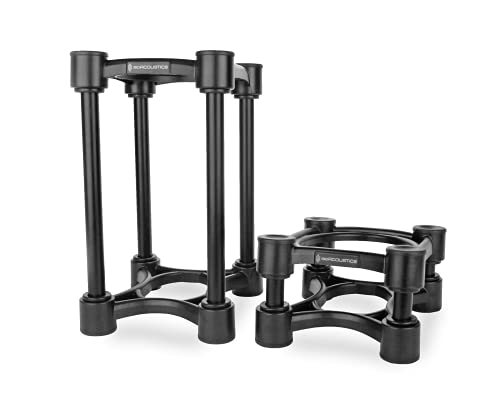
IsoAcoustics ISO-155
The default answer for 5-inch nearfields. It is an adjustable-height, adjustable-tilt stand built around a shaped elastomer isolator, and the published capacity covers monitors up to roughly 18 lb (8.2 kg) each. Height range is about 2.5–8 in depending on how you set the two halves, with tilt in both directions, so you can hit ear level on a 29 in desk with most 5-inch cabinets. Footprint is roughly 7 in wide by 6 in deep per stand. Market range is usually $100–$150 per pair. Buy it if your tweeter currently sits 3–6 in below your ears and you want one purchase to settle the question.
IsoAcoustics ISO-200
The same design scaled up for 6.5-inch and small 8-inch monitors, rated to about 27 lb (12.3 kg) each. The lift range is similar to the ISO-155 but the platform is longer, which matters because a 6.5-inch cabinet has a deeper base and will overhang a smaller stand. Typical market range $130–$200 per pair. If your monitor weighs 20 lb and you are looking at the ISO-155 because it is cheaper, do not — you will be at 110% of its rating and the elastomer will bottom out.
IsoAcoustics ISO-430
The heavy-duty member of the family, rated for cabinets up to about 60 lb (27 kg). This is the one for midfield monitors and large nearfields where the cabinet itself is doing real work below 60 Hz. Expect $250–$400 per pair. The footprint is large — plan on 9 in of desk depth per stand — and the assembly is heavy enough that shipping weight for a pair can exceed 15 lb.
IsoAcoustics Aperta and Aperta 200
The Aperta line does the same job with a lower profile and a different look: an aluminium frame with the isolator built in and a tilt adjustment, aimed at monitors up to roughly 35 lb. The Aperta 200 covers heavier cabinets. Because the frame is slimmer, the Aperta is the better choice when you want the monitor to look like it is floating on a stand rather than sitting on a block. Market range usually $200–$400 per pair. The trade-off against the ISO series is less total height range, so measure first.
IsoAcoustics ISO-PUCK and ISO-PUCK mini
Puck-shaped isolators sold in sets of four, sized for small desktop monitors and for propping up other gear. The mini version handles light speakers; the larger version handles small nearfields. There is no height adjustment at all — they add about an inch — so they solve decoupling, not geometry. Market range $60–$120 per set. The right use case is a monitor that is already at ear height on a raised shelf or a desk riser, where you just need to break the mechanical connection.
Primacoustic Recoil Stabilizer (RX5, RX7, RX9)
A different approach: a dense foam base with a laser-cut steel plate bonded on top, sized by the width of your monitor. The steel adds mass, which pushes the assembly’s resonance down and gives the low end a tighter, more controlled character than foam alone. The foam underneath handles the decoupling. Weight capacity varies by size and covers typical nearfields up to about 30–40 lb. Market range usually $150–$300 per pair. The footprint is the largest of any desktop option — 8–10 in wide and up to 12 in deep — so it suits a deep desk or a console.
Auralex MoPAD, MoPAD-XL and ProPAD
The classic four-pad foam solution. Two pads go under the front of the monitor and two under the back, and you can arrange them flat, angled up or angled down. Market range $30–$80 per pair. They work well under 3- to 5-inch desktop monitors and are the cheapest way to test whether decoupling makes an audible difference in your room. The limitations are real: no meaningful height adjustment beyond the pad thickness, and foam takes a compression set under constant load, so plan on replacing them every couple of years if the monitors stay put.
Auralex SubDude
A larger platform in the same family, designed for subwoofers. Worth mentioning because a sub sitting on a hardwood floor is the single worst vibration source in a small studio, and the fix is the same idea at a bigger scale. Market range usually $60–$120. If your sub is on a suspended wood floor, this is the highest-value isolation purchase in the room.
Ultimate Support MS-80 and MS-100
Desktop monitor stands with a wide base and an adjustable platform, sold as a pair. They are aimed at nearfields and include isolation feet or pads. Market range $60–$120. The advantage over a pure isolator is stability: the base is wide enough that a bump from a cat or a coffee cup will not topple a 20 lb cabinet. The disadvantage is that the included decoupling is usually simpler than a dedicated elastomer stand.
Gator Frameworks desktop monitor stands
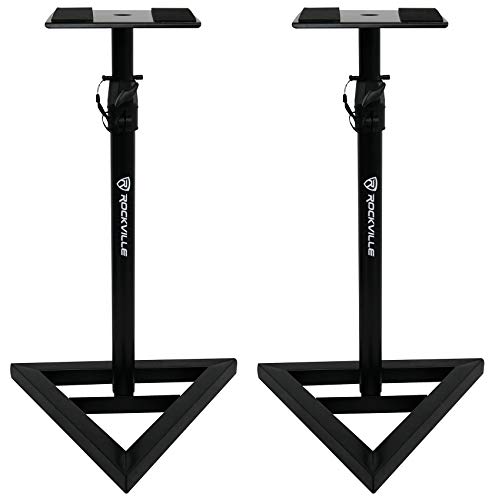
A range of free-standing and clamp-on desktop stands. The clamp-on versions free up the entire desk surface, which is the right answer on a shallow 24 in desk. Look for a stated load capacity — clamp models are typically rated in the 30–60 lb range and the clamp jaw needs about 1–2 in of desk thickness to grip properly. Market range usually $60–$150 per pair.
On-Stage SMS6000 and SMS7500
Simple, sturdy desktop stands with a platform and a padded base. Load ratings are in the 40–60 lb range depending on model, which is more than most nearfields need. Market range $50–$120. These are stands first and isolators second: they get the monitor to the right height reliably, and you can add a foam or elastomer pad on the platform if you want more decoupling.
Kanto S2, S4, S6 and SP series
Desktop speaker stands with a fixed upward tilt and rubber isolation pads, sized to match common monitor footprints. The S-series sits low; the SP-series raises the cabinet more and is the one to look at if your tweeter is 4 in or more below ear level. Market range $50–$150 per pair. They are popular with desktop and home-office setups because the tilt is built in and the finish matches typical speaker cabinets.
Soundrise PRO, AL and DUO
Wooden desktop stands with a built-in upward angle and a felt or rubber base. The idea is to combine a plinth (mass) with a compliant base (decoupling) in one piece. Market range usually $80–$200 per pair. They suit people who want the stand to look like furniture and who are willing to accept a fixed angle rather than adjustable height.
Argosy and Zaor studio furniture with integrated platforms
At the other end of the market, studio furniture makers build monitor platforms into desks and racks, usually with adjustable spikes or isolator feet. Market range for a desk with integrated monitor shelves is typically $300–$2,000 depending on size and finish. This is the right answer if you are buying furniture anyway, because the platform is designed around the desk’s resonance rather than added to it. It is the wrong answer if you only need 3 in of lift.
DIY: Sorbothane hemispheres or load-matched PU pads plus a wood plinth
A practical option that often outperforms cheap commercial pads. Take a piece of 1 in (25 mm) solid maple, bamboo or Baltic birch plywood cut to the monitor’s footprint, then add four viscoelastic hemispheres or engineered PU pads underneath, sized so each one is loaded to its rated window. A 20 lb monitor on four pads means 5 lb per pad, so choose pads rated near that figure, not ones rated to 30 lb each. Total cost is usually $30–$80 for a pair of plinths. This gets you mass, stiffness and matched decoupling at once. Avoid plywood thinner than 3/4 in (19 mm) — it will flex and add its own resonance.
Desk-clamp and wall-mounted VESA shelves
When desk space is the binding constraint, the monitor leaves the desk entirely. A clamp-on arm or a wall shelf rated for the cabinet’s weight, with an isolation pad between shelf and monitor, gives you zero desk footprint and, in the case of a wall mount, a completely different transmission path — the wall rather than the desk. Market range $60–$200. Check two things: the arm’s stated load capacity (aim for 1.5× the monitor weight) and whether the wall is masonry or a stud wall, because a 25 lb monitor on a shelf bracket needs real anchoring.
Decision matrix: match the stand to your situation
| Situation | Best fit | What to prioritise | What to avoid |
|---|---|---|---|
| Small apartment, one desk, 5 in monitors | Adjustable elastomer stand, ISO-155 class | Height range and tilt | Steel-plate bases that eat 20% of the desk |
| Renter, will move within two years | Foam pad set or puck isolators | Low weight, no wall anchors, no residue on the desk | Adhesive-mounted pads and heavy furniture |
| Kids or pets in the room | Wide-base stand with a high load rating | Tip resistance and a non-slip base | Tall, narrow stands and loose puck feet |
| Back or neck pain, long sessions | Continuous height adjustment to exact ear level | Getting the acoustic center level, not approximate | Fixed-angle wooden stands with no height range |
| Standing desk, height changes daily | Isolators under the monitors and under the desk feet | Decoupling both ends of the path | Assuming monitor pads alone fix a rattling frame |
| 8 in monitors on a deep console | Steel-plate recoil base or ISO-430 class | Load capacity in the middle of the range | Foam-only pads under a 40 lb cabinet |
| Subwoofer on a suspended wood floor | Large isolation platform | Load rating and a rigid top plate | Small pads that the sub’s feet miss entirely |
Assembly, moving and durability realities
Isolation products are simple, but a few practical details cause most of the disappointment.
Shipping and box weight. A pair of adjustable elastomer stands typically ships at 6–10 lb total. Steel-plate recoil bases are much heavier — a pair can be 15–25 lb in the box — and solid wood plinths add 4–8 lb per stand. If you are moving a studio, that is the difference between one trip and three.
Doorways and shelves. Standard interior doorways are 28–32 in wide, so nothing here is a doorway problem. Storage is: a pair of 9 × 12 in recoil bases takes about 216 sq in of shelf, which is more than most people expect.
What wears first. In rough order of failure: foam compression set (6–24 months under constant load), adhesive backing on stick-on pads (12–24 months, especially in warm rooms), elastomer creep (3–5 years), rubber feet hardening from UV and ozone (3–6 years), and paint or coating chipping on steel plates (cosmetic, immediate). Threaded height adjusters are the most common mechanical failure — over-tightening strips the insert, so hand-tighten and stop.
Temperature. Viscoelastic polyurethane stiffens noticeably when cold. If a stand ships in freezing weather, let it sit at room temperature for 24 hours before you judge how it sounds; a cold isolator behaves like a rigid block.
Residue and finishes. Some elastomers plasticise over time and can leave a mark on a lacquered or oiled wood desk. Put a thin felt or cork layer between the isolator and any finished surface you care about, and check the manufacturer’s compatibility note before putting an elastomer directly on a French-polished top.
Double decoupling. Stacking a foam pad on top of an elastomer stand on top of a wooden plinth does not multiply the benefit. It creates a tall, springy assembly that lets the monitor rock, which smears transients and makes the image wander. Use one decoupling stage, done well.
What to avoid
- Buying at the top of the load range. A stand rated “up to 30 lb” under a 29 lb monitor will compress and stop isolating.
- Ignoring height entirely. A perfectly decoupled monitor with its tweeter 8 in below your ears still sounds dull and image-shifted.
- Steep downward tilt. Angling a monitor down more than about 10 degrees fires more energy into the desk, which is the surface you were trying to get away from.
- Pads that only touch part of the cabinet. If the monitor’s feet or corners miss the pads, you have not decoupled anything.
- Isolating the monitors but not the sub. The sub is usually the largest vibration source in a small room.
- Assuming a stand fixes room modes. Below 200 Hz you are still hearing your room; a stand removes the desk’s contribution, not the walls’.
- Buying two different heights. Left and right monitors at different heights or angles will pull the center image sideways.
FAQ
Do isolation stands actually change what I hear?
Yes, but mostly in the low-mid range and in image stability, not in a dramatic “night and day” way. If your desk is a thin laminate top and your monitors are 8 in, the change is obvious. If your desk is a heavy solid-core slab and your monitors are 4 in, the change is subtle. The reliable test is to play a familiar track with a strong, simple bass line and listen for whether the note ends cleanly or has a tail — that tail is often the desk, not the recording.
Foam pads or elastomer stands?
Match to cabinet weight and to how much height you need. Foam is fine up to about 15–20 lb per monitor and when you are already close to ear height. Elastomer stands win above that weight, and they are the only desktop option that gives you real height and tilt adjustment.
My monitors already have rubber feet. Do I still need stands?
Rubber feet reduce sliding and add a little damping, but they are stiff and thin, and they do not give you height. They are a floor-protection feature more than an isolation feature. If your tweeters are at ear level already, good feet may be enough; if they are not, feet will not solve it.
Can I use the same product under a subwoofer?
Only if the load rating covers it. A subwoofer often weighs 30–60 lb and has a wide footprint, so a monitor pad set will compress flat under it. Use a platform rated for the weight, with a top plate large enough that all four feet land on it.
Will raising the monitor make the sound worse?
Only if you raise it past ear level or tilt it down steeply. The goal is the acoustic center at ear height with the cabinet roughly level, or angled up slightly toward your ears.
How much should I spend?
For most desktop nearfield setups, $60–$200 per pair covers the useful range. Below that you are buying foam, which is fine for light monitors. Above about $250 you are paying for weight capacity, finish and brand rather than a fundamentally different acoustic result.
Should I isolate the desk legs too?
If you have a standing desk, a thin desk top, or a suspended wood floor, yes. Pads under the desk feet reduce the path from floor to desk. It is a small additional spend and it addresses a different transmission route than monitor pads do.
Do I need to re-check the setup after buying?
Yes. Once the monitors are up, re-measure the listening triangle, re-set toe-in, and confirm both acoustic centers are at the same height. Moving a monitor up 4 in changes the distance to your ears, so the triangle geometry shifts slightly and the toe-in usually needs a small adjustment.
How to choose in one line
Measure your seated ear height, subtract the height of the tweeter with the monitor on the desk, and buy the cheapest stand that covers that lift while being rated for roughly 1.5× your monitor’s weight — elastomer if the cabinet is heavy, foam if it is light, steel-plate if you want the tightest low end and have the desk depth to spare.






