Key takeaways
- Best Overall: MOLENTS Ergonomic Mesh Office Chair: BIFMA X5.1 certified per listing, adjustable lumbar support, 3D arms and tilt
- Best With Headrest: HOLLUDLE Ergonomic Mesh Office Chair: V back, 2D headrest, 3D adjustable lumbar support and 350 lb capacity
- Best Value Lumbar Chair: Fizzin Mesh Computer Chair: adjustable lumbar support at a lower tier
- Best Simple Low-Back: Boss Office Products Posture Task Chair (B305): armless, low-back task chair
- Best Kneeling Chair: NYPOT Ergonomic Kneeling Chair: adjustable seat and a rocking base
- Best Budget Kneeling Chair: DRAGONN by VIVO Ergonomic Kneeling Chair: angled seat and an adjustable stool design
The best desk chair for good posture in this guide is the MOLENTS Ergonomic Mesh Office Chair, which lists BIFMA X5.1 certification, adjustable lumbar support and 3D arms, and the HOLLUDLE V-back mesh chair is the runner-up if you want a headrest and a 350 pound rating. If you prefer an open-hip seated position, the NYPOT and DRAGONN kneeling chairs are the two alternatives, and the Boss Posture Task Chair is the simple low-back option for short desks.
A chair cannot give you good posture by itself, and no chair is a treatment for back pain. What a chair can do is make a neutral, upright seated position easier to hold: feet flat, knees near 90 degrees, a lower back that is supported, elbows level with the desk and a screen at eye height. This guide ranks six chairs by how well their listed features support that position, and then walks through the seat, lumbar and arm settings that matter most, with numbers you can check at your own desk. If you search for the best desk chair for posture, start with the settings, then the chair.
This guide is research-based. We did not personally use these products. We compared listing details, maker information and independent ergonomics guidance, and wrote not listed whenever a spec was missing. Prices are shown as tiers only. If you have pain, numbness or a medical condition, ask a doctor or physical therapist before choosing a chair.
Our top picks



As an Amazon Associate we earn from qualifying purchases at no extra cost to you.
Top Picks at a Glance
- Best Overall: MOLENTS Ergonomic Mesh Office Chair: BIFMA X5.1 certified per listing, adjustable lumbar support, 3D arms and tilt
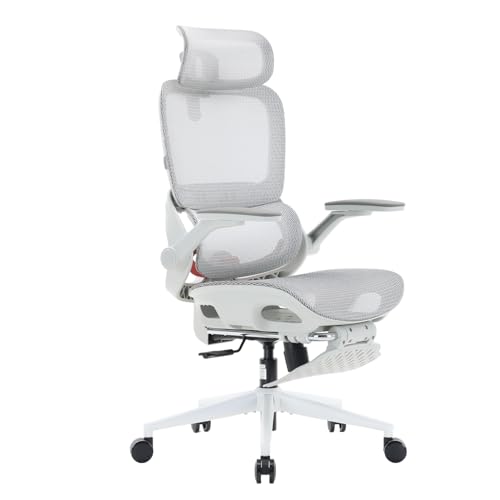
- Best With Headrest: HOLLUDLE Ergonomic Mesh Office Chair: V back, 2D headrest, 3D adjustable lumbar support and 350 lb capacity
- Best Value Lumbar Chair: Fizzin Mesh Computer Chair: adjustable lumbar support at a lower tier
- Best Simple Low-Back: Boss Office Products Posture Task Chair (B305): armless, low-back task chair
- Best Kneeling Chair: NYPOT Ergonomic Kneeling Chair: adjustable seat and a rocking base
- Best Budget Kneeling Chair: DRAGONN by VIVO Ergonomic Kneeling Chair: angled seat and an adjustable stool design
Comparison Table: Lumbar, Arms and Seating Style
| Product | Best for | Key specs (from listing) | Watch for | Price tier |
|---|---|---|---|---|
| MOLENTS Ergonomic Mesh Office Chair | Full-day desk work | Mesh; BIFMA X5.1 certified; adjustable lumbar support; 3D arm; tilt back | Weight rating not shown in the short title | Premium |
| HOLLUDLE Ergonomic Mesh Office Chair | Leaning back and calls | V back; 2D headrest; 3D adjustable lumbar support; 350 lb capacity | Large footprint | Mid-range to Premium |
| Fizzin Mesh Computer Chair | A first ergonomic chair | Mesh; adjustable lumbar support; home-office design | Arm and tilt details not listed | Mid-range |
| Boss Posture Task Chair (B305) | Low desks, short sessions | Low back; no arms; posture task design | No arms; less back height | Mid-range |
| NYPOT Ergonomic Kneeling Chair | Short focused sessions | Kneeling design; adjustable seat; rocking stool for desk | Pressure on shins; no back support | Premium |
| DRAGONN by VIVO Ergonomic Kneeling Chair | Trying a kneeling seat | Angled seat; adjustable stool; home and office use | Limited padding; no back support | Mid-range |
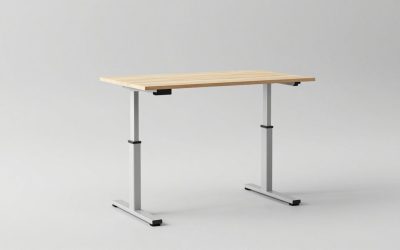
Think about posture as a system. A chair that is great but paired with a desk that is too high will still push the shoulders up. A monitor that is too low will still pull the neck forward. Before you buy a new chair, check the desk height (about 28 to 30 inches), the monitor top at or slightly below eye level, and the keyboard at elbow height.
A commonly cited routine in workplace health guidance is to sit for about 20 minutes, stand for about 8 and move for about 2. You do not need to follow it exactly, but changing position often is better than any static position, even a well-supported one.
A five-minute posture check you can do with any chair: sit back so your hips touch the backrest, place your feet flat, and measure the gap between the seat front and the back of your knees. Two to three finger widths is a comfortable gap. Next, let your arms hang, bend your elbows to 90 degrees and see where your hands land compared with the desk. If the desk is higher, raise the seat or lower the desk, and add a footrest if your feet no longer reach the floor. Finally, look straight ahead and note where your eyes land on the screen; the top edge should be near eye level.
How the chair types differ: a lumbar-adjustable mesh chair such as the MOLENTS or the Fizzin supports the lower back and lets you recline, so it suits long typing sessions. A headrest chair such as the HOLLUDLE adds support for leaning back. A low-back task chair such as the Boss B305 keeps the footprint small but ends below the shoulder blades. Kneeling chairs remove the backrest altogether and put the weight on the seat and shins, so they are a change-of-position tool and not an all-day seat.
Common sizing guide by height: people under 5 feet 3 inches should look for a seat that goes down to about 16 inches or lower and a seat depth under 17 inches. People between 5 feet 4 inches and 6 feet usually fit most adjustable chairs. People over 6 feet 1 inch should check that the seat height reaches 21 inches or more, that the seat is at least 18 inches deep and that the backrest is tall enough to reach the shoulder blades. Weight rating matters too, as does seat width for broader frames.
Budget planning: a good adjustable chair is a multi-year purchase. If you sit at the desk four hours or more a day, spending more on adjustable lumbar and arms is easier to justify than buying two cheaper chairs. If you are not sure what you need, buy from a seller with a clear return window and set the chair up within the first few days, so that you can send it back if the fit is wrong.
A last practical tip: take a photo of yourself from the side at the desk, with the chair set the way you think is right. Compare your ear, shoulder and hip line, check whether your knees are bent at roughly 90 degrees, and see whether your wrists are straight. Small changes, such as lowering the monitor by an inch or raising the seat by half an inch, can make the setup feel noticeably better without buying anything new.
1. MOLENTS Ergonomic Mesh Office Chair: Best Overall for Posture Support
Key specs
- Mesh back and seat design
- BIFMA X5.1 certified per listing
- Adjustable lumbar support
- 3D arm adjustment
- Tilt back; weight rating and seat size: not listed in the short title
Best for: full-day desk work where you want a lumbar curve, arm height and tilt to match your body.
Skip if: you want a very low price or a chair with a simple one-lever setup.
BIFMA X5.1 is a commercial furniture standard for the durability and safety of office chairs. A listing that mentions it signals that the maker aims at office-grade strength, though you should check the product page for the specific test documentation. It is a reassuring detail for a chair you will use every day.
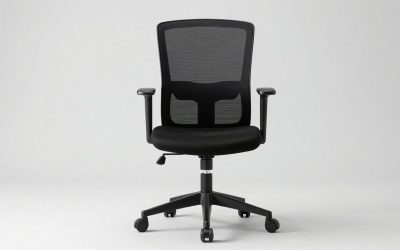
Adjustable lumbar support is the key posture feature. The idea is to place a gentle curve at the small of your back so you are less likely to slump. 3D arms move in several directions, which lets you bring the forearms to desk height with shoulders relaxed. A tilt back lets you change the angle as you work or lean back for a break.
Set it up in order: seat height first, so feet are flat and knees are near 90 degrees; then lumbar height so it sits in the curve of your lower back; then arm height; then tilt tension. Re-check after a week, because your first settings are often a guess.
Pros
- Office-grade standard mentioned
- Adjustable lumbar and arms
- Breathable mesh
- Tilt for changing position
Cons
- Premium tier
- Weight rating not in the short title
- More settings to learn
2. HOLLUDLE Ergonomic Mesh Office Chair: Best With Headrest and V-Back
Key specs
- V-shaped mesh back
- 2D headrest
- 3D adjustable lumbar support
- 350 lb capacity listed
- Seat size and tilt range: not listed in the short title
Best for: people who alternate between upright work and leaning back, such as in calls or reading.
Skip if: your desk has a shelf or a hutch that a headrest could hit.
The V-back shape follows the line of the spine with a slight outward flare at the shoulders. The aim is to support the back without trapping heat, as mesh does. The 3D lumbar control allows you to fit the support to your height and the depth of your lower-back curve.
The 2D headrest adjusts in height and angle. For upright typing, it should sit just behind the head without pushing it forward. Only use it as a rest when you lean back; do not rely on it to hold your head up for long periods.
A 350 pound capacity listed in the title is a useful number. It suggests a stronger base and gas lift than typical lighter chairs, and it provides a safety margin for most adults.
Pros
- Headrest and lumbar adjustments
- 350 lb capacity listed
- Mesh airflow
- Good for mixed work and rest
Cons
- Bulky footprint
- Seat size not listed
- Headrest can interfere with some desk setups
3. Fizzin Mesh Computer Chair: Best Value Lumbar-Adjustable Chair
Key specs
- Mesh computer chair
- Adjustable lumbar support
- Home-office design
- Height adjustable
- Arms, tilt and weight rating: not listed in the short title
Best for: people stepping up from a basic chair who want adjustable lumbar support without a premium cost.
Skip if: you need a documented weight rating or many arm adjustments.
Adjustable lumbar support at a mid-range tier is the main reason to look at this chair. Many chairs at lower prices have a fixed bump that suits some people and misses others. An adjustable piece lets you move the support up or down to match your lower back.
Because the short title does not list tilt or arm details, check the full listing and photos. If the arms are fixed, measure the arm height against the underside of your desk. If the tilt is a simple rock, consider whether you need a lock.
For many home offices, a chair like this covers most needs. It does not have every feature of a top-tier model, but it is a step up from a basic chair.
Pros
- Adjustable lumbar support
- Mesh back
- Mid-range tier
- Simple design
Cons
- Fewer details in the short title
- Weight rating not listed
- No headrest listed
4. Boss Office Products Posture Task Chair (B305): Best Simple Low-Back Chair
Key specs
- Low-back task chair
- No arms
- Posture task design
- Model B305
- Seat size and weight rating: not listed in the short title
Best for: short desks, drawing tables and small spaces where an armless, low-back chair is enough.
Skip if: you need upper-back support or armrests for long typing sessions.
Boss Office Products is an established office-furniture maker, and the B305 is a plain task chair with no arms. It suits desks where armrests would get in the way, and for sessions of an hour or two it keeps the back supported at the lumbar level.
A low back is not for everyone. If you spend many hours in front of a screen, you may prefer a mid- or high-back chair that supports the shoulder blades. Use this chair as a secondary seat, for a shared desk or for craft and admin tasks.
The armless design lets you move your arms freely and tuck the chair under the desk. Check that the seat height range works for your desk and your leg length.
Pros
- Established brand
- Armless and compact
- Simple design
- Lumbar-level support
Cons
- Low back
- No armrests
- Limited details in the short title
5. NYPOT Ergonomic Kneeling Chair: Best Kneeling Option
Key specs
- Kneeling design
- Adjustable seat
- Rocking stool design
- Described for desk use
- Weight rating and padding: not listed in the short title
Best for: short, focused work blocks when you want a different position from a standard chair.
Skip if: you have knee, shin or ankle problems, or you plan to use it for hours at a time.
A kneeling chair tilts your pelvis slightly forward and opens the angle between your thighs and torso. Some people find this encourages an upright position. Others find it uncomfortable on the shins and knees. It is a different tool, not a better one.
The rocking design allows small movements, which may feel more active than a fixed seat. It has no back support, so your core muscles do the work. This makes it best for short sessions of 20 to 40 minutes, and many users alternate with a regular chair.
If you have a medical condition or joint pain, ask a doctor or physical therapist before trying a kneeling chair. Start with short sessions and stop if you feel numbness or pain.
Pros
- Different seated position
- Adjustable seat
- Rocking motion
- Small footprint
Cons
- No back support
- Pressure on shins and knees
- Premium tier
6. DRAGONN by VIVO Ergonomic Kneeling Chair: Best Budget Kneeling Chair
Key specs
- Angled kneeling seat
- Adjustable stool design
- Black finish
- For home and office use
- Padding and weight rating: not listed in the short title
Best for: people who want to try a kneeling seat before investing in a premium one.
Skip if: you need a chair that you can sit in for long periods or with a backrest.
DRAGONN by VIVO is a lower-cost way to try a kneeling seat. The angled seat and the shin pad make it a simple stool-style piece of furniture. Because it has no back, it works best as a second seat that you use for part of the day.
Make sure the seat height matches your desk. In a kneeling position, your thighs are angled downward, so you often need a slightly higher seat than a regular chair. Check the height range on the full listing.
As with any kneeling chair, take breaks, switch to a regular chair, and stop if you feel pain.
Pros
- Lower cost than premium kneeling chairs
- Angled seat
- Compact
- Easy to move
Cons
- No back support
- Limited padding
- Not for long sessions
Also Consider
Marsail Ergonomic Office Chair: A high-back mesh chair with adjustable lumbar support; a mid-range alternative to the MOLENTS.
LuxErgo Ergonomic Mesh Office Chair: A mid-back mesh chair with lumbar support, armrests and a 115 degree recline listed.
VECELO Mid-Back Swivel Ergonomic Chair: A mid-back mesh chair with adjustable arms and lumbar support at a budget tier.
BestOffice Ergonomic Mid-Back Swivel Chair: A very low-cost mid-back chair with lumbar support for light daily use.
How We Chose
We built the list around features that support an upright, neutral seated position: adjustable lumbar support, adjustable arms, a tilt mechanism and a supportive back, plus two kneeling chairs as a different approach. We read each listing for these features, checked for standards or capacity numbers and compared them with independent ergonomics guidance.
We did not personally use these products. When the short listing did not show weight ratings, seat size or tilt range, we noted not listed and recommend you read the full page. We avoided any claim that a chair treats or prevents pain.
We ranked by adjustability first, then by build signals such as certification or capacity, then by price.
Buying Guide
Set the seat height first
With feet flat on the floor, thighs should be roughly parallel to the floor and knees near 90 degrees. Most adults need a seat height range of about 16 to 21 inches. If your feet do not reach, use a footrest. If your knees are above your hips, raise the seat.
Place the lumbar support
The support should sit in the curve of your lower back, roughly at the height of your belt line. Adjustable height is more useful than a fixed bump. If the support pushes you forward, lower the tension or move it down.
Match arms to your desk
Arms should let your shoulders relax with elbows at about 90 degrees. Armrests that are too high push the shoulders up; too low and they do nothing. Flip-up or 3D arms help fit different desk heights.
Tilt, recline and movement
A tilt mechanism lets the chair follow you as you lean back. Use a lock for upright typing and a recline for rest. Changing position every 30 to 45 minutes is often more helpful than finding one perfect setting.
Monitor and keyboard height
The top of the screen should be at or slightly below eye level, about an arm length away. The keyboard should be at elbow height. A laptop stand and an external keyboard are the easiest fix for laptop users.
Common Posture-Chair Mistakes
Expecting a chair to fix everything is the biggest mistake. If the desk, screen or keyboard are in the wrong place, the best chair cannot compensate.
A second mistake is using the highest lumbar setting right away. Start in the middle, then adjust a little at a time over several days.
A third is skipping movement. Take short breaks, stretch and walk, and if pain persists, see a health professional.
Frequently Asked Questions
What is the best desk chair for good posture?
A chair with adjustable lumbar support, adjustable arms and a tilt mechanism, such as the MOLENTS, makes it easiest to hold a neutral seated position. The right setup matters as much as the chair.
Do kneeling chairs improve posture?
They change the angle of the pelvis and may make an upright position feel easier for some people, but they can be hard on shins and knees. Use them for short sessions and ask a professional if you have joint issues.
Is a mesh back better for posture?
Mesh itself does not improve posture. It improves airflow. What matters is the shape of the back and the lumbar support.
How high should lumbar support be?
Roughly at the small of your back, near belt height. Adjust it so it supports the curve without pushing you forward.
Can a chair cure back pain?
No. A chair can make sitting more comfortable, but it is not a treatment. If you have back pain, talk to a doctor or physical therapist.
Should my feet touch the floor?
Yes. Feet flat on the floor or a footrest keep your legs supported and your pelvis steady.
How often should I change position?
Many workplace guides suggest changing position every 30 to 60 minutes, with a short walk or stretch.
Which One Should You Buy?
If you work at a desk most of the day, buy the MOLENTS for its adjustable lumbar, arms and tilt. If you want a headrest and a documented 350 pound rating, choose the HOLLUDLE. For a lower-cost step up, the Fizzin offers lumbar adjustment.
For a small desk or a short session, the Boss B305 is the simple option. If you want to try a different seated position, the DRAGONN is the lower-cost kneeling chair and the NYPOT is the premium one. Use any kneeling chair for short sessions only.
Sources
- MOLENTS product listing for the Ergonomic Mesh Office Chair
- HOLLUDLE product listing for the V Back Mesh Office Chair
- Fizzin product listing for the Mesh Computer Chair
- Boss Office Products product listing for the Posture Task Chair B305
- NYPOT and DRAGONN by VIVO product listings for kneeling chairs
- Workplace ergonomics guidance on seating and posture from OSHA and university ergonomics programs
Last updated: October 2026