Key takeaways
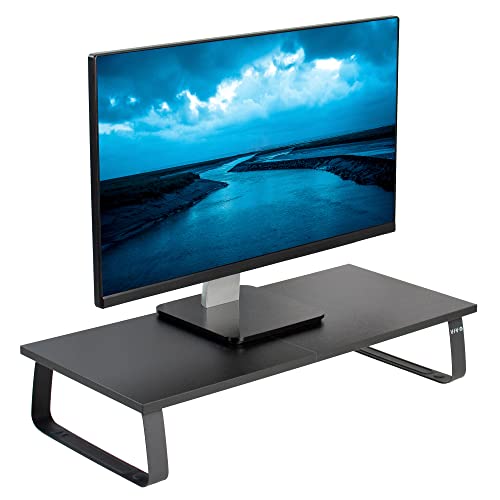
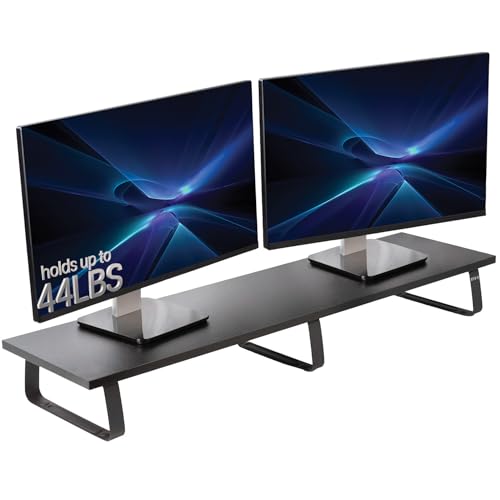
- Best Overall: WALI Computer Monitor Stand (PTT001-B), 44 lb capacity and open space underneath.
- Best Value: HUANUO Monitor Stand Riser, three heights plus airflow vents.
- Best Budget With Storage: OPNICE 2-Tier Monitor Stand Riser with Drawer, a desk organizer and riser in one.
- Best Portable and Foldable: Uncaged Ergonomics WorkEZ, aluminium, folds flat for small rooms.
- Best Metal Riser: BoYata Adjustable Height Metal Desktop Riser, open space for keyboard or storage.
- Best for a Warmer Look: Simple Houseware Dual Monitor Stand Riser with Drawer in rustic brown.
The best computer screen holder for most home desks is a simple riser, and our top pick is the WALI Computer Monitor Stand (PTT001-B): it lifts the screen, lists a 44 lb capacity, and leaves open storage underneath for a keyboard or notebooks at a very low cost. The runner-up is the HUANUO Monitor Stand Riser, which offers three height settings and airflow vents, so it adapts if you share the desk with someone taller. If you want the shelf and drawer look of a built-in organizer, the OPNICE two-tier riser with a drawer is the tidy option.
This guide is for people who want a screen holder for a desk at home, whether that desk is in a bedroom corner, a dining table or a spare room. Instead of an arm that clamps to the desk edge, a riser sits on the desk, needs no tools and does not touch the desk finish. We cover six risers, four alternates and the numbers that decide a good fit: platform size, height, weight limit and what the space underneath can hold. All specs come from the maker’s listing text, and anything not stated is marked “not listed”. We did not personally use these products, so this is a research-based buying guide.
Our top picks

As an Amazon Associate we earn from qualifying purchases at no extra cost to you.
Top Picks at a Glance
- Best Overall: WALI Computer Monitor Stand (PTT001-B), 44 lb capacity and open space underneath.
- Best Value: HUANUO Monitor Stand Riser, three heights plus airflow vents.
- Best Budget With Storage: OPNICE 2-Tier Monitor Stand Riser with Drawer, a desk organizer and riser in one.
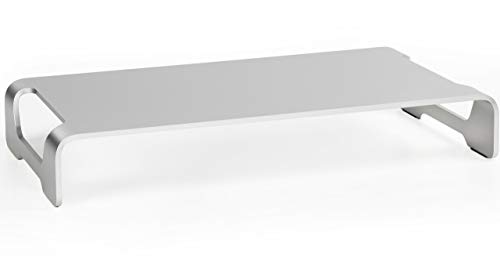
- Best Portable and Foldable: Uncaged Ergonomics WorkEZ, aluminium, folds flat for small rooms.
- Best Metal Riser: BoYata Adjustable Height Metal Desktop Riser, open space for keyboard or storage.
- Best for a Warmer Look: Simple Houseware Dual Monitor Stand Riser with Drawer in rustic brown.
Quick Comparison Table
| Product | Best for | Key specs (from listing) | Watch for | Price tier |
|---|---|---|---|---|
| WALI Monitor Stand (PTT001-B) | Everyday single screen | Up to 44 lbs; under-desk storage; fits monitors, laptops, printers | Platform size not in the title | Budget |
| HUANUO Monitor Riser | Shared desks, adjustable height | 3 height settings; airflow vents; desk organizer style | Weight limit not listed in the title | Budget |
| OPNICE 2-Tier Riser with Drawer | Cluttered desks | 2-tier; drawer; 2 pen holders; black | Weight limit not listed | Budget |
| Uncaged Ergonomics WorkEZ | Small rooms, travel | Aluminium; 16 x 11 in panel; rotates 360; holds up to 13 lb; folds flat at 3.1 lb | Light weight limit | Mid-range |
| BoYata Metal Desktop Riser | Heavier setups, open storage | Height adjustable metal; open space underneath; for monitors, laptops, iMacs, PCs and TVs | Capacity not in the title | Mid-range |
| Simple Houseware Riser with Drawer | Home look, phone and tablet slot | Dual monitor width; drawer; organizer tray; phone and tablet slot; rustic brown | Needs a wide desk | Mid-range |
1. WALI Computer Monitor Stand (PTT001-B): Best Overall
- Capacity: up to 44 lbs
- Use: monitors, laptops, printers, home, office and school
- Storage: under-desk space beneath the platform
- Pack: 1 pack, black
- Platform dimensions and height: not listed in the title
Best for: one monitor or a laptop plus a keyboard tucked under. Skip if: you need a height adjustment; the title does not state one.
A 44 lb capacity is far above what a typical monitor weighs, so you can safely stack a printer or a monitor and a small speaker on the platform without worrying about sag. For a home desk, the open space underneath is the practical win. A keyboard slides under to free space, a notebook or a stack of paper fits beneath, and the desk surface looks tidier.
The best use of a riser like this is to bring the top of the screen up to eye level. If you work on a laptop, a riser also lets you use a separate keyboard, which is a more comfortable arrangement. The main thing to check before you buy is the platform width against your monitor’s base. A base wider than the platform will overhang, so check the dimensions on the maker’s page.
Pros: very low cost; high capacity; works with monitors, laptops and printers; open storage underneath. Cons: no listed height adjustment; platform size not in the title; no drawer or organizer features.
2. HUANUO Monitor Stand Riser: Best Value
- Height: three adjustable settings
- Airflow: vents on the platform
- Use: monitor, laptop, PC, printer
- Style: desk organizer riser
- Weight limit: not listed in the title
Best for: a desk shared by people of different heights or a screen that needs fine height tuning. Skip if: you want a drawer or a wood finish.
Three height settings is the feature that matters here. A riser that cannot change height is a guess, and a wrong guess means your neck bends up or down all day. Being able to step between settings lets you match the riser to your own seated eye level and then change it if you move to a different chair.
The airflow vents are a nice touch if you use a laptop with the lid open, because the platform lets some air pass beneath. We do not claim any cooling effect, since the listing does not give figures. Because the weight limit is not in the title, check the maker’s page if you plan to put a heavy monitor on it.
Pros: three heights; airflow vents; low cost; works with laptops and monitors. Cons: weight limit not listed in the title; plain styling; no drawer.
3. OPNICE 2-Tier Monitor Stand Riser with Drawer: Best Budget With Storage
- Design: 2-tier computer monitor stand riser
- Storage: drawer and 2 pen holders
- Use: monitor, laptop, office supplies
- Color: black
- Dimensions and capacity: not listed in the title
Best for: a small desk that always ends up covered in pens, chargers and sticky notes. Skip if: you want the highest possible weight capacity.
This riser does two jobs: it lifts the screen and it adds a place for small things. The drawer holds small items such as sticky notes, a USB stick or earbuds, and the pen holders keep writing tools upright rather than rolling around. On a bedroom or dining-table desk where space is limited, that is a worthwhile combination at a budget price.
The trade-off is that organizers rarely beat plain risers on capacity, and the title does not list a weight limit. A monitor weighing 8 to 14 lbs is typically fine on this sort of platform, but verify the number on the maker’s page. Also make sure the drawer does not hit your keyboard or the edge of a keyboard tray when it opens.
Pros: riser and organizer together; drawer and pen holders; low cost; tidy look. Cons: capacity and size not listed in the title; drawers add depth that some desks cannot spare; fewer height options.
4. Uncaged Ergonomics WorkEZ Adjustable Monitor Stand Riser: Best Portable and Foldable
- Material: aluminium
- Panel: 16 x 11 inches, rotates 360 degrees
- Capacity: holds up to 13 lbs
- Weight and storage: folds flat, 3.1 lbs
- Height: adjustable, details on the maker page
Best for: small rooms, shared desks, or anyone who packs the riser away at the end of the day. Skip if: your monitor weighs more than 13 lbs.
The 13 lb limit is the number to read first. It suits lighter screens and laptops, and a typical 24 inch monitor can fall near or below it, but many 27 inch panels weigh more, so check your own monitor’s bare weight. The 16 by 11 inch platform is compact. That is good for a dining table or a shared home desk where you set up and take down each day, but it can be too small for a wide monitor base.
The fold-flat design at 3.1 lbs is the reason to consider this one. A riser that slides into a drawer or a laptop bag means that on days you do not need it, the table is clear. The 360 degree rotating panel lets you turn the screen toward someone else without lifting it.
Pros: folds flat; lightweight aluminium; rotating panel; compact. Cons: 13 lb limit; small platform; mid-range cost for a small riser.
5. BoYata Monitor Stand, Adjustable Height Metal Desktop Riser: Best Metal Riser
- Material: metal
- Height: adjustable
- Space: open storage underneath
- Use: monitors, laptops, iMacs, PCs and TVs
- Color: black; capacity not listed in the title
Best for: a sturdy riser for a desktop all-in-one or a larger screen. Skip if: you want built-in drawers.
A metal riser tends to feel stiffer than a wooden or plastic one, and the listing names iMacs and PCs as targets, which suggests the maker built it for heavier items than a laptop. The open space underneath is a practical feature because it takes a keyboard, a small box of supplies or a pair of speakers.
Because it does not list a capacity in the title, confirm that number on the maker’s page, particularly if you intend to put a desktop PC on top. The height adjustment is helpful because the correct riser height depends on your chair, desk and monitor, not on the product.
Pros: metal build; adjustable height; open space beneath; named for iMacs and PCs. Cons: capacity not listed in the title; no organizer features; mid-range cost.
6. Simple Houseware Desk Dual Monitor Stand Riser with Drawer: Best for a Warmer Look
- Design: dual monitor width riser with drawer
- Finish: rustic brown
- Extras: customizable organizer tray, built-in phone and tablet slot, side storage
- Dimensions and capacity: not listed in the title
- Use: one wide or two screens, plus a laptop
Best for: a desk where the riser is on show, such as a living room or bedroom setup. Skip if: your desk is under about 40 inches wide.
Many home desks are used for several things in one day, and a rustic brown finish blends better with wood furniture than a black plastic riser. The built-in phone and tablet slot is a real convenience: it holds a phone for video calls or a tablet for notes, so you stop hunting for a stand.
Wide risers need a wide desk. Since the title gives no dimensions, check the length and depth on the maker’s page before you buy; a riser that is too deep can push the screen too close to your face, and a riser that is too wide may hit a wall or lamp. The drawer and side storage are handy for small items, but they also make this a bulkier piece.
Pros: warm finish; phone and tablet slot; drawer and side storage; fits wide setups. Cons: dimensions and capacity not in the title; bulky; mid-range cost.
Also Consider
- Canyora Monitor Stand Riser, 2 Pack: three height settings, 14.6 x 9.3 inch metal shelf and a listed 44 lb capacity. Good if you want two risers for two desks.
- WESTREE Dual Monitor Stand Riser: wood and steel, for two monitors, laptop, printer or TV, in rustic brown. A solid choice for a double-screen setup.
- Simple Trending Monitor Stand with Drawer: 2-tier, black, 20 in wide, 10 in deep and 5.8 in tall, with a drawer and 2 pen holders. Handy if exact dimensions matter.
- Fenge Dual Monitor Stand, Corner Desk Shelf: corner desk shelf with a drawer and slide-out tray and a modular design. A premium option for L-shaped desks.
How We Chose
We started from the product store listings for real, currently sold riser-style screen holders and narrowed to six main picks and four alternates. For each we compared the stated capacity, platform size, height adjustment, storage features and finish from the maker’s listing text. We kept it to two models per brand at most, covered budget to mid-range tiers, and mixed plain risers, organizer risers and one foldable portable model.
We did not personally use these products, and we do not quote star ratings, review counts or sales ranks. Many riser listings do not state a capacity or dimensions in the title, so we marked those as “not listed” and recommend confirming them on the maker’s page. Prices appear only as tier words because they move often. For ergonomic guidance we drew on general public workstation guidance.
Buying Guide
Riser or arm?
A riser sits on the desk, needs no tools, does not touch the desk edge and can be moved in seconds. An arm clamps to the desk, frees all the desk surface and lets you place the screen precisely. For a rented room, a dining table, a glass desk or a thin edge, a riser is the easier answer. For a desk you own, with a solid edge and a need for maximum surface, consider an arm instead. Neither is better for everyone; it depends on the desk and how you use it.
Work out the right height
The goal is the top of the screen at or just below your eye level when you sit up straight. Here is a simple worked example. Sit in your chair and measure from the desk to your eye; say it is 18 inches. A 24 inch 16:9 monitor’s visible screen is about 11.8 inches tall, so the bottom of the screen should be about 6 inches above the desk. If the monitor’s own stand holds the bottom edge about 2.5 inches up, you need roughly a 3.5 inch riser. A 27 inch screen is about 13.2 inches tall, so the bottom edge should be about 4.8 inches up, which makes a riser of around 2 to 3 inches enough. These are illustrative figures, so measure your own.
| Screen | Visible screen height | Typical riser height needed* |
|---|---|---|
| 22 in | about 10.8 in | about 4 to 5 in |
| 24 in | about 11.8 in | about 3 to 4 in |
| 27 in | about 13.2 in | about 2 to 3 in |
| 32 in | about 15.7 in | about 0 to 1 in |
*Assumes an eye height of about 18 in above the desk and a monitor stand that holds the bottom edge about 2.5 in up. Your numbers will differ.
Check the platform and the desk depth
A monitor base is often 8 to 10 inches wide and 6 to 9 inches deep, but sizes vary, so measure yours. A riser should be at least as wide as the base, and the desk should be deep enough that the screen sits about an arm’s length away, roughly 20 to 30 inches. A 24 inch deep desk with a drawer riser can leave you too close to the screen, so choose a slimmer riser on shallow desks.
Weight limit and stability
Monitors typically weigh 6 to 22 lbs depending on size, and a laptop or printer adds more. Pick a riser with a stated capacity well above the load, and check whether it has non-slip feet. Wooden and metal risers with a drawer are heavier and steadier, but the drawer reduces the amount of weight the center can carry in some designs, so check the maker’s notes.
Storage underneath
The space under a riser is its second feature. An open design works for a keyboard or notebooks, a drawer holds small items, and an organizer tray keeps cables and chargers in one place. Do not block the monitor’s vents, and do not store anything that might press against the screen cable.
Common Mistakes to Avoid
- Buying a riser that is narrower than the monitor base.
- Choosing a riser that is too tall, so the screen sits above eye level.
- Ignoring desk depth, so the screen ends up too close.
- Skipping the weight limit when the riser also carries a printer.
- Placing a hot laptop on a riser with no gap for air.
Which Riser Fits Which Home Desk
Home desks come in awkward shapes, and the best screen holder depends more on the furniture than on the screen. This matrix maps common situations to a choice from the list above.
| Your desk | What to watch | Good fit |
|---|---|---|
| Dining table used part-time | You need to clear the table every evening | Uncaged Ergonomics WorkEZ, which folds flat |
| Small bedroom desk, about 36 to 40 inches wide | Every inch of surface counts | OPNICE 2-tier with drawer, or the WALI with open storage |
| Shared desk, two people of different heights | Eye level differs between users | HUANUO with three height settings |
| Wide desk, 55 inches or more, two screens | Riser must span both bases | Simple Houseware dual riser, or the WESTREE alternate |
| Desktop all-in-one or heavier screen | Capacity and stiffness | BoYata metal riser, after confirming its limit |
| Corner or L-shaped desk | Straight risers waste the corner | Fenge corner shelf alternate |
A tidy-desk layout that works with any riser
Once the riser is in place, the arrangement of everything else decides whether the desk feels calm or cluttered. Put the screen centered on the riser and about an arm’s length from your seat. Slide the keyboard into the space underneath whenever you are not typing, which gives you a clear surface for writing or a laptop. Keep one cable path along the back edge of the desk so that the power and video cables do not drape across the riser. Use the drawer or tray for the small things that migrate across the desk, such as pens, a charging cable and sticky notes, and leave the top of the riser for the screen and, at most, a small plant or lamp.
If you notice neck strain after a few weeks, treat the riser height as the first thing to adjust, then the chair height, then the distance to the screen. Small changes of half an inch matter more than people expect. Persistent pain is a reason to talk to a doctor or a physical therapist rather than to keep adjusting furniture.
Frequently Asked Questions
What is the best computer screen holder for a desk?
For most home desks, a riser such as the WALI Computer Monitor Stand is the best simple answer because it is cheap, strong and tool-free. If you want a drawer, pick the OPNICE; if you want height steps, pick the HUANUO.
How high should a monitor riser be?
High enough that the top of the screen is at or just below your eye level when you sit up straight. For many 24 inch monitors on a normal desk, that is often around 3 to 4 inches, but measure your own eye height.
Can a riser hold a monitor and a printer?
Only if the riser lists a capacity above the combined weight. The WALI lists up to 44 lbs and names printers as a use, while others do not list a capacity in the title, so check the maker’s page.
Is a riser better than a monitor arm?
A riser is easier and kinder to a thin or rented desk, while an arm frees more surface and offers finer positioning. Choose by your desk and how often you move the screen.
Will a riser work with a laptop?
Yes, but use a separate keyboard and mouse so your hands stay at a comfortable height while the screen sits at eye level. Several risers here name laptops as a use.
Do I need a wide riser for two monitors?
Yes. A dual-width riser such as the Simple Houseware or WESTREE spans two screens. Measure your desk width and the two monitor bases first.
Are foldable risers sturdy enough?
They are fine within their stated limit. The WorkEZ lists up to 13 lbs, so it suits light screens and laptops rather than large monitors.
Which One Should You Buy?
If you want the simplest strong answer, buy the WALI Computer Monitor Stand. If you share the desk or want fine height control, take the HUANUO. If you want to clear desk clutter, the OPNICE drawer riser does both jobs. For a room where the riser has to pack away, the Uncaged Ergonomics WorkEZ is the choice, the BoYata suits heavier or all-in-one setups, and the Simple Houseware riser is the warmer-looking option for a wide desk. Measure your eye height, your monitor’s base and your desk depth before you order.
Sources
- WALI manufacturer product pages
- HUANUO manufacturer product pages
- Uncaged Ergonomics manufacturer product page
- BoYata, OPNICE and Simple Houseware manufacturer product pages
- OSHA computer workstation ergonomics guidance
Last updated: October 2026